XPages Event parameters solution found

>It’s very interesting that event parameters retrieval is totally undocumented and there is no articles / blogentries about it on the web. You should know that I have been searching and trying to get the solution thru the community but with no luck.

 
But Now I have found the solution
 
When triggering a onClick event the this object will contain a XspEventHandler and
this object has a method called getParameters() this method will return a Java ArrayList.
The arraylist will contain the parameters with name and value.
So to print all parameters you can walk thru them like this
 
var value=this.getParameters();
var tmp=””;

for(x=0;x

tmp+=value.get(x).getName()+” – “+value.get(x).getValue();
}
 
tmp will then contain a string will all the names and data of the event parameters for you to display.

Check out my article in the application development wiki

>Anybody know how event parameters work in XPages

>I have been searching for information on how to retrieve them but with no luck.

It’s probably dead simple but I don’t know how. If you do please send me and comment 😉
The solution
http://everythinglotus.blogspot.com/2010/09/xpages-event-parameters-solution-found.html

>Inbox Rules engine could be used for more

>Lotus competencesImage via WikipediaThis if the rules engine of Lotus Notes could be used for more than sorting emails into folders.

When working in the inbox you would like it to help you. Imagine if you automatically could create tasks,calendar appointments from certain incoming emails.
Perhaps create documents in the notebook template to store interesting newsletters.
a more intelligent inbox that can automatically do stuff for you and just leave a summary in the inbox for you like the out of office summary would be a great help to everybody that receives alot of emails.
Googles approach with the priority inbox, that sorts the emails with different priority depending how often you send / read emails to a recipient is also very interesting but that will probably only solve a little bit of the problem.
Enhanced by Zemanta

>Agent alias revisited in 8.5.2 Gold

>As I wrote before about having aliases on agents that doesn’t have brackets around them.

Although the agent itself is only shown in the agent list, in 8.5.1 this did break the agent name.
And in earlier code drops of 8.5.2 this was an problem too. But as I wrote in my Earlier post I was confident that this would be solved until we reach GOLD of 8.5.2 and it did so if you have used agents that has a name like this “(my agent)” and an alias like this “my agent” this works really well now in 8.5.2.


Enhanced by Zemanta

>Lotus Connections got a competitor from Lockhead Martin

>Lockhead Martin releases a open source communications platform called Eureka Streams.

the platform is released under Apache 2.o license
To know more about Eureka Streams check it out at www.eurekastreams.org
Enhanced by Zemanta

>Swedish army changing email

>The swedish armed forces decided to change to Lotus Notes in 2001 and the project was fully implemented in 2005. They have now decided to replace Lotus Notes / Domino with MS Exchange and one of the major reasons why they do this is because Lotus Notes doesn’t support the new security classification that the new SAP system they will begin to use “Prio” require this.

The interesting part is that the company that implements “Prio” for the armed forces is IBM.
So the new SAP system that IBM is implementing will move the 20 000 users from Lotus Notes to Exchange.
Some swedish Links

Enhanced by Zemanta

>Finding the end of the code segment in a java agent

>

My Del.icio.us Tags :)Image by halidCan! (: via Flickr


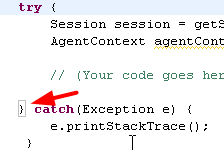
If you edit some java code in the new eclipse based Domino designer you can find the end of your code by placing the cursor behind the start { then the end } will get a box around it

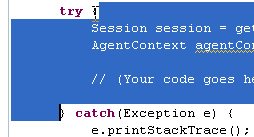
But if you doubleclick at the start { you get this instead much easier to find the end or what do you think?
I think this is a great way to find the end.
Reblog this post [with Zemanta]

>Does the lack of fullscreen editing in the eclipse based designer annoy you

>I hate it until I found a way around it, that I haven’t seen this documented.

Just double click on the tab you want to edit in fullscreen.
And double click again you you want to go back.
Simple, yes
Reblog this post [with Zemanta]

>Notes Icons becomes simpler in 8.5.2

>In the CD:s of Notes 8.5.2 (Beta) the great addition of adding an image as a icons is added.

Finally, this is a great addition that makes the creation of Application icons much simpler.
You can add gif and jpeg images that is 32×32 in size as your application icon.

>HTML 5 Smokescreen kills flash totally

>The demo of the new soon to become opensource JS library SmokeScreen.

Displays flash with out flash installed on your computer.
Check it out it’s very cool, now all the major browsers just have to support html5
and we can skip flash. And the installation is so simple just check out this.
http://smokescreen.us/
Reblog this post [with Zemanta]