# XPageDeveloper.com Knowledge Base
Generated: 2026-10-07 08:15:20
## The Lotusscript class map is back
**Source:** [https://xpagedeveloper.com/2026/the-lotusscript-class-map-is-back](https://xpagedeveloper.com/2026/the-lotusscript-class-map-is-back)
**Date:** 2026-04-22
**Category:** Posts
OpenNTF has done it again they have created an interactive class map of LotusScript like the one we all know from the old days as a poster on our office wall. Now you can buy a big touch screen and mount on you office wall displaying the classes. If you do have one post a comment with an image showing the new poster on your office wall.
you can find the map here [https://openntf.org/ls/index.html](https://openntf.org/ls/index.html) and the annoncement here [OpenNTF reintroduce the Lotusscript class map](https://openntf.org/main.nsf/blog.xsp?permaLink=GACS-DTBKFL)
---
## Empty categories in views still visible
**Source:** [https://xpagedeveloper.com/2025/empty-categories-in-views-still-visible](https://xpagedeveloper.com/2025/empty-categories-in-views-still-visible)
**Date:** 2025-12-13
**Category:** Posts
Views in HCL Domino can look clean or confusing depending on how you handle categories. A common issue is empty categories that appear for some users and disappear for others. This happens when the view depends on documents the user cannot read.
Domino shows a category only when at least one document in that category is visible. If all documents are restricted by Readers or Authors fields, the category stays hidden.
The problem starts when a response document is readable but the main document is not. The user can open the response through a link or lookup. The user cannot see the main document in the view. The category that the main document belongs to stays hidden. Domino treats the category as empty even if the response document exists. The response document does not create a category on its own.
You will notice this when users report that they see a response but cannot find it in the view. They think the category is missing. The real issue is access control on the main document.
You can reduce this problem with some simple checks.
• Keep Readers fields aligned across main and response documents.
• Avoid workflows where main documents are more restricted than their responses.
• Review the view selection so it includes documents users can read.
• Test with different user roles to see how categories collapse.
If you want to expose response documents even when the main document is hidden. Change so response documents is not displayed in a hierarchy . If you want predictable category behavior, give the parent and response documents the same visibility thru the readers and authors fields.
This keeps your views stable. It keeps users from wondering why a category disappears even when they know a response exists.
---
## Quick LLM Access via 4 Lines of Code
**Source:** [https://xpagedeveloper.com/2025/quick-llm-access-via-4-lines-of-code](https://xpagedeveloper.com/2025/quick-llm-access-via-4-lines-of-code)
**Date:** 2025-11-10
**Category:** Posts | **Tags:** Domino 14.5, LLM, olama, OpenAI
4 lines of code to call a LLM, with **zero maintenance** in the future with **DominoIQ**.
Can you find any devtool that make it simpler to use LLM:s like
OpenAI, Claude, Llama, Mistral code setup?
This is the code that makes the magic happens
```
`_Dim LLM As NOTESLLMREQUEST,llmresp As NOTESLLMRESPONSE,resp as string Set LLM=session.Createllmrequest() Set llmresp=llm.Completion(db.server, "StdReplyEmail", "This is the text you want to respond to") resp=llmresp.Content_`
```
_StdReplyEmail_ is the predefined LLM prompt to be used (This one is delivered with DominoIQ). Resp will hold the response from the LLM that you can use for your purpose.
Start testing with DominoIQ today, if you need to help with the setup check out [Serdars great post](https://lotusnotus.com/2025/07/connecting-domino-iq-external-llm-providers/)
---
## @Formula debug time saver snippets
**Source:** [https://xpagedeveloper.com/2025/formula-debug-time-saver-snippets](https://xpagedeveloper.com/2025/formula-debug-time-saver-snippets)
**Date:** 2025-08-19
**Category:** IBM Lotus Domino, IBM Lotus Notes
If you are working with applications that is using Forms directly in the client but especially on the Webb here is some handy tips how to avoid debugging your code for hours.
1. Always use @iserror or [FailSilent] with @DBLookups
**_@dblookup("":"recache";@dbname;"test view";"test value";1;[FailSilent])_**
or
**_Ret:=@dblookup("":"recache";@dbname;"test view";"test value";1)
@if(@iserror(Ret);@return("");"");_**
And you code continues
or use
**_Ret:=@dblookup("":"recache";@dbname;"test view";"test value";1);
validatedRet:=@if(@iserror(Ret);"";Ret);_**
And your code continues
2. @DBColumn doesn't have fail silent so use the @iserror way instead
3. When you are using @DocGetField(Document UNID;"FieldName")
if you are getting a document that has readers and authors fields always use
**_Ret:=@if(@iserror(@DocGetField(UNID;FieldName));"";**_@DocGetField(UNID;FieldName)_**);_**
If you don't use that your code will crash on the webb if you can't access or the document you are getting data from is deleted
**Update 2025-08-20:**
Thanks Knud Erik Højslet for pointing out that **@iferror** is a deprecated command, the code above is updated. Also updated from nocache to recache pointed out by Vladislav Tatarincev.
---
## Domino IQ and OpenAI
**Source:** [https://xpagedeveloper.com/2025/domino-iq-and-openai](https://xpagedeveloper.com/2025/domino-iq-and-openai)
**Date:** 2025-08-13
**Category:** Posts
Check out this great write up by **Serdar Basegmez** about how to use Domino IQ with an external LLM provider. And you could follow the same guide with any other provider, because almost everybody is using the same API syntax as OpenAI.
[https://lotusnotus.com/2025/07/connecting-domino-iq-ext](https://lotusnotus.com/2025/07/connecting-domino-iq-external-llm-providers)[e](https://lotusnotus.com/2025/07/connecting-domino-iq-external-llm-providers)[rnal-llm-providers](https://lotusnotus.com/2025/07/connecting-domino-iq-external-llm-providers)
---
## Read html from a docx file
**Source:** [https://xpagedeveloper.com/2025/read-html-from-a-docx-file](https://xpagedeveloper.com/2025/read-html-from-a-docx-file)
**Date:** 2025-07-30
**Category:** Posts | **Tags:** Apache, POI, XPages
If you are using the [OpenNTF Poi extension](https://www.openntf.org/main.nsf/project.xsp?r=project/POI%204%20XPages) this is quite simple to preform because there is an bean called **poiBean** that have a function called **buildHTMLFromDocX** this function takes an InputSteam and you can get an input stream from a NotesEmbeddedObject.
a simple example where you have stored an attachment in a richtext field called attachment and this doc is shown in hte view attachment. The code below is placed on an xpage button and the Xpage as an computed text that will show the Extracted viewScope data.
```
`var v:NotesView=database.getView("test") var doc:NotesDocument=v.getFirstDocument() var rt:NotesRichTextItem=doc.getFirstItem("Attachment") var att:NotesEmbeddedObject=rt.getEmbeddedObjects()[0] var is:java.io.InputSteam=att.getInputStream() var oi:java.io.ByteArrayOutputStream=poiBean.buildHTMLFromDocX(is) viewScope.Extracted=oi.toString()`
```
If you want to parse the [HTML jsoup](https://jsoup.org/) is a great library
Check out my other [Poi example](http://xpagedeveloper.com/2015/if-your-user-want-reports-in-excel-you-should-read-this) published several year ago
---
## Single Sign-On configuration is invalid
**Source:** [https://xpagedeveloper.com/2025/single-sign-on-configuration-is-invalid](https://xpagedeveloper.com/2025/single-sign-on-configuration-is-invalid)
**Date:** 2025-07-16
**Category:** Posts
If you are getting this error when adding a SAML or Multi server SSO configuration
HTTP Server: Error loading Web SSO Cookie Names Configuration 'LtpaToken' for Web Site 'xxxx)' (Single Sign-On configuration is invalid)
There is an [technote](https://support.hcl-software.com/csm?id=kb_article&sysparm_article=KB0038666)article about this, but I don't know if that help so much. Check if the server is added to participating server field in the LTPAToken document, because otherwise will not the server be able to see the document.
For other SAML problems check out my SAML article [Debugging SAML setups in HCL Domino](http://xpagedeveloper.com/2022/debugging-saml-setups-in-hcl-domino)
---
## Connect with multiple tenants using a single ip
**Source:** [https://xpagedeveloper.com/2025/connect-with-multiple-tenants-using-a-single-ip](https://xpagedeveloper.com/2025/connect-with-multiple-tenants-using-a-single-ip)
**Date:** 2025-07-15
**Category:** Posts
With the **ENABLE_SNI=1** notes.ini parameter you can have multiple host names and they can use https with with and without Let's Encrypt certs. but the good thing is that this is also supported using SAML.
This means that if you company have multiple tenants in Office 365 or if you are using Okta you can add them and use SAML as login thru two different hostnames.
This isn't a new thing probably worked since the parameter was introduced in Domino 11 only that I haven't tested this until now 🙂
Once again does Domino simplify admin work in a complex it environment.
Check out my summary post about [SAML in Domino](http://xpagedeveloper.com/2022/debugging-saml-setups-in-hcl-domino) if you haven't
---
## XPages: No component found with ID
**Source:** [https://xpagedeveloper.com/2025/xpages-no-component-found-with-id](https://xpagedeveloper.com/2025/xpages-no-component-found-with-id)
**Date:** 2025-04-23
**Category:** Learn XPages, XPages | **Tags:** CLFAD, XPages Error
If you are doing XPage development and are getting an error that there is no component handling the submit event. In my case it was when saving new documents but it could happen otherwise also.
The solution was in my case to not save the NotesDocument, use the XSP Datasource instead.
So I did
var doc:NotesDocument =document1.getDocument(true)
Created some reader and author fields and did
doc.save(true,false)
And did a full refresh on the button and got the crash but only on new documents.
What I did was changing the doc.save to document1.save()
Also check any visible or disable ssjs if you are checking a value in the ssjs doc or the notes document.
due to the update events they do not always sync. So make sure that you check the value in the same context as the value is set if the document is new.
i.e doc.replaceItemValue("Status","Open") try changing this to document1.replaceItemValue("Status","Open") if that solves you issue.
CLFAD0380E: No component found with ID $$xspsubmitid= to handle the submit event.
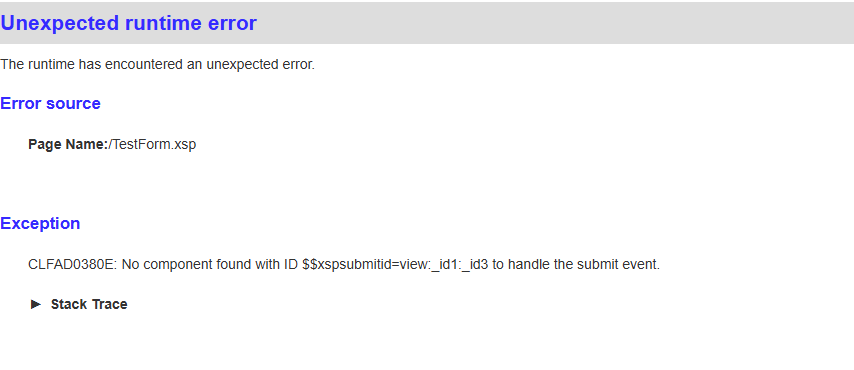
Check out my [XPAGE Error page for more](http://xpagedeveloper.com/2022/strange-xpage-unexpected-runtime-error)
---
## Thank you
**Source:** [https://xpagedeveloper.com/newsletter-thanks](https://xpagedeveloper.com/newsletter-thanks)
**Date:** 2025-03-27
Thanks for subscribing to my newsletter, if you need to contact me use contact in the top menu or reply on any newsletter email.
Have a great day
Fredrik
---
## Agent\(s\) do not run on server
**Source:** [https://xpagedeveloper.com/2025/agents-do-not-run-on-server](https://xpagedeveloper.com/2025/agents-do-not-run-on-server)
**Date:** 2025-03-14
**Category:** Domino Administration | **Tags:** Domino
If you see this error on the server
**AMgr: Error executing agent 'Agentname' in 'Database'. Agent signer 'Servername': You are not authorized to perform that operation**
These are the things you need to check
1. Database ACL, what are the access rights for the user
2. Server document, security section and Programmability Restrictions
3. Check the agent and security tab if run on behalf of has a user that doesn't have access rights
Feel free to drop a comment if you have some more great troubleshooting tips for agents
---
## Disable access to the API endpoint in Domino
**Source:** [https://xpagedeveloper.com/2025/disable-access-to-the-api-endpoint-in-domino](https://xpagedeveloper.com/2025/disable-access-to-the-api-endpoint-in-domino)
**Date:** 2025-03-13
**Category:** Posts
All newer versions of Domino has an API endpoint for the Domino Rest API. If you have a domino server that you do not want to expose this endpoint on you can create some webserver redirections to turn this off. This is how you do it, first create a substitution rule to another location in this cased api2 and after that a redirection rule.

And after that create an redirection rule to you preferred destination

---
## Check out the new HCL Digital Solutions Community
**Source:** [https://xpagedeveloper.com/2025/hcl-digital-solutions-community](https://xpagedeveloper.com/2025/hcl-digital-solutions-community)
**Date:** 2025-03-12
**Category:** Posts
The Digital Solutions Community is now public and open for you, register and start to participate

[https://developer.ds.hcl-software.com](https://developer.ds.hcl-software.com) or use my short link [https://bit.ly/DominoForum](https://bit.ly/DominoForum)
---
## Attachment Filenames in lowercase
**Source:** [https://xpagedeveloper.com/2025/attachment-filenames-in-lowercase](https://xpagedeveloper.com/2025/attachment-filenames-in-lowercase)
**Date:** 2025-03-12
**Category:** Lotusscript, Posts
If you are getting all attachment filenames in lowercase in Domino 12.02 then that is because there is an option to normalize attachment filenames that if I'm guessing enabled by default in some fixpacks.
The default behavior is changed in FP6 back to how it was before
SPR# MDLSDCSMFV - Programmability - LotusScript - Attachments - Fixed an issue where the internal attachment filenames were being changed to lowercase/half pitch to fix an issue in TMAICWHDAY. This was resulting in applications that used LotusScript EmbeddedObjects.Name property to show attachment names in lowercase/half pitch - note that EmbeddedOjbect.Source property contains the user friendly name. To fix this, the fix for TMAICWHDAY is now off by default - set AttachNamesNormalize=1 to enable the fix for TMAICWHDAY. This regression was introduced in 11.0.1 FP9, 12.0.2 FP4 and 14.0 FP2.
[https://ds_infolib.hcltechsw.com/ldd/fixlist.nsf/8ed1b46cfdba8957852570c90054623b/d01bc51222e6b8f985258c440048487b?OpenDocument](https://ds_infolib.hcltechsw.com/ldd/fixlist.nsf/8ed1b46cfdba8957852570c90054623b/d01bc51222e6b8f985258c440048487b?OpenDocument)
---
## SSL Certifier is not trusted
**Source:** [https://xpagedeveloper.com/2025/ssl-certifier-is-not-trusted](https://xpagedeveloper.com/2025/ssl-certifier-is-not-trusted)
**Date:** 2025-01-07
**Category:** Posts | **Keyword:** SSL Java Domino XPages root cert not Trusted
I have seen a problem with getting data using XPages or agents from Amazon hosted services because they now are using a Amazon Trusted Root. But it can be others poping up also in the future.
That then recalled my memory about a post I did several years ago
[http://xpagedeveloper.com/2017/getting-data-from-an-https-site-in-backend-using-xpages](http://xpagedeveloper.com/2017/getting-data-from-an-https-site-in-backend-using-xpages)
Is if you are experiencing problems with services hosted on Amazon with The Amazon C1 root cert or Amazon M02 2024 cert you need to import them.
You can find the root certs here [https://www.amazontrust.com/repository/](https://www.amazontrust.com/repository/)
If you need to add if for agents check out this technote
[https://support.hcl-software.com/csm?id=kb_article&sysparm_article=KB0035853](https://support.hcl-software.com/csm?id=kb_article&sysparm_article=KB0035853)
Some error messages that you might see on the console
javax.net.ssl.SSLHandshakeException
java.security.cert.CertificateException
startHandshake
com.ibm.domino.napi.ssl.DominoX509TrustManager
checkServerTrusted
DominoX509TrustManager
Check out [Certinfo](http://xpagedeveloper.com/2023/certificate-information-tool-v4)a small tool that I've created to help with getting enddates from certificates
---
## Important note if you install a IF patch
**Source:** [https://xpagedeveloper.com/2024/important-note-if-you-install-a-if-patch](https://xpagedeveloper.com/2024/important-note-if-you-install-a-if-patch)
**Date:** 2024-12-20
**Category:** Posts
As I think many of you have done is to install the new IF mail fixpack on you servers.
One important note regarding IF fixpacks is that they are usually not recognized by ordinary fixpacks
and needs to be uninstalled before applying newer Fixpacks.
So to avoid problems and extra work in the future, always keep the latest Fixpack and IF packs stored on the server so I can uninstall and reinstall them easy.
Also checkout [Daniels deeper post](https://blog.nashcom.de/nashcomblog.nsf/dx/domino-releasefixpackiterimfix-what-is-it-and-how-to-install.htm)about the same topic.
Happy Christmas Patching
---
## Domino Mail routing problems
**Source:** [https://xpagedeveloper.com/2024/domino-mail-routing-problems](https://xpagedeveloper.com/2024/domino-mail-routing-problems)
**Date:** 2024-12-16
**Category:** Posts | **Tags:** Domino, mail routing | **Keyword:** Domino mail routing problem
HCL got a big Friday the 13:th problem, due to a bug created back in early days of the Domino server when no one saw anything beyond 5 years ahead as a potential problem. Simplified what I've read is that a limit in an calculation formula for epoch dates created this problem that made the function return -1 instead of an incremental number, a complete writeup will come later from HCL in the technote.
This makes the mail routing to stop working if you have more than one mailbox, routing between servers to get to the internet. Read the technote here it's updated continuously and if you can apply the hotfixes do so.
[https://support.hcl-software.com/csm?id=kb_article&sysparm_article=KB0118192](https://support.hcl-software.com/csm?id=kb_article&sysparm_article=KB0118192)
HCL is as always quick on the problem and did within 24 hours identify the problem and did release fixes for the domino versions that is active in maintenance now. A big shoutout to all developers that has worked to getting this out so fast for version 11,12 and 14 (Fixes is uploaded where you can download other fixes), if you still are on version 9 or 10 you could get a fix if you are on an extended support plan by opening a support ticket.
So for most companies that has servers that is on any earlier version than 11 might have potential problems with mail routing and server mail rules.
**My initial findings is that if you only have one server, one mail.box no mail rules you are not affected** **by mail deliver problems**, it could be other things that stops working other than mail rules because the problem makes settings not being loaded from the config.
**NO PANIC FOR ADMINS with the above config regarding mail delivery**
(comment if you have found something)
I usually like to try checking out if there is an workaround, I started to check if there was a notes.ini parameter to set Max mail hops but I couldn't find that one.
Then I switch over to check what the problem was and found that removing all extra mail.box databases so you only have one (mail.box). This makes the emails being sent out if you run the send agent on that server, that fixes some of the problems.
Emails being routed from other servers only routes one server from the sent server and then gets stuck. But if I use release held email they are being routed. Hmmm, so I created an scheduled agent in another database and check for emails in the mail.box that has the specific attributes and the field $hops set to 0.
That actually releases and sends the emails in my environment, It doesn't solve problems with mail rules and potential everything but some is my findings. It needs to be on all servers that get emails from other servers sent to them to be routed.
**Of course the [hotfixes from HCL](https://my.hcltechsw.com/downloads/domino) is always the best to apply **but if you don't have the possibility this might help you temporary to get this working with mail routing without the hotfixes for a while, until you can upgrade the server.
Adam wrote a good post about ways to get the patches with / without your agreement with HCL. [http://ab1osborne.blogspot.com/2024/12/your-support-options-for-friday-13th.html?m=1](http://ab1osborne.blogspot.com/2024/12/your-support-options-for-friday-13th.html?m=1)
If you are located in Sweden and have licensing questions feel free to reach out to me thru this page or thru my company [QNOVA](https://qnova.se) if you are located in some other part of the world check out the [partner locator](https://www.hcl-software.com/resources/partner-connect/partner-ecosystem)
Another this that has come up is that because the problem makes the server go back to 1 mailbox and the fix is using the correct number again. Remember that emails can then be stuck in mail.box that you need to copy over to one of the active boxes after the patch.
Also you need to have "Hold undeliverable mail" set to enable

Older version of the nab template

If the interim installer is failing with the error message "Notes/Domino related process is still running" - see Installing FixPack/Hotfix on Windows fails due to Windows Management Instrumentation Service KB0038497
[https://support.hcl-software.com/csm?id=kb_article&sysparm_article=KB0038497](https://support.hcl-software.com/csm?id=kb_article&sysparm_article=KB0038497)
This is the code I have in the extra database with the scheduled agent. ( You can't add it to mail.box )
**This code is used a your own risk, without any HCL support and it will NOT fix all problems related to this bug.**
```
`Dim session As New NotesSession Dim mailboxdb As New NotesDatabase(session.Currentdatabase.server,"mail.box") Dim v As NotesView Dim doc As notesdocument If mailboxdb.Isopen Then Set v=mailboxdb.Getview("mail") Call v.Refresh() v.Autoupdate=false Set doc=v.Getfirstdocument() Do While Not doc Is Nothing If Not doc.hasitem("hopsretry") Then If doc.Getitemvalue("RoutingState")(0)="HOLD" Then If CStr(doc.Getitemvalue("$hops")(0))="0" then Call doc.Replaceitemvalue("RoutingState","") Call doc.Removeitem("SaveOptions") If doc.Hasitem("RoutingState") And Not doc.getitemvalue("RoutingState")(0)="" Then 'Keep Form Else If doc.Hasitem("MailSavedForm") And Not doc.getitemvalue("MailSavedForm")(0)="" Then Call doc.Replaceitemvalue("Form",doc.Getitemvalue("MailSavedForm")) ElseIf doc.Hasitem("AppointmentType") Then Call doc.Replaceitemvalue("Form","Notice") Else Call doc.Replaceitemvalue("Form","Memo") End If End If Call doc.Replaceitemvalue("$Hops",25) Call doc.Removeitem("RoutingStateBy") Call doc.Replaceitemvalue("hopsretry",1) Call doc.save(True,False) End if End If End If Set doc=v.Getnextdocument(doc) Loop End if `
```
---
## Partial Restoring databases
**Source:** [https://xpagedeveloper.com/2024/partial-restoring-databases](https://xpagedeveloper.com/2024/partial-restoring-databases)
**Date:** 2024-11-04
**Category:** Posts
If you are using the new Domino Backup solution or another backup method to restore a database for partial data retrieval, there are a few important considerations to keep in mind.
1. **DAOS Configuration**: If DAOS (Domino Attachment and Object Service) is enabled, you must perform the restore on the server. This is because attachments are stored separately from the database.
2. **Disable All Agents**: When placing the restored database on the server, make sure to disable all agents to prevent them from running unintentionally.
3. **Secure the Database ACL**: Lock down the Access Control List (ACL) of the database to ensure it remains secure during the restoration process.
4. **Change the Replica ID**: If you are restoring the database to a different location than the original file path, it is crucial to change the replica ID.
This last step is particularly important. Failure to change the replica ID can lead to serious issues on the server. The Domino server identifies databases using their replica IDs, and having duplicate IDs may cause the server or client to access the wrong database. In the best case, this might result in an "You are not authorized" error; in the worst case, it could cause unexpected and confusing behavior.
**Always remember**: When restoring a database for partial information retrieval or to inspect data from old backups, make sure to change the replica ID to avoid these problems.
---
## How Developers can cope with Information Overload
**Source:** [https://xpagedeveloper.com/2024/how-developers-can-cope-with-information-overload](https://xpagedeveloper.com/2024/how-developers-can-cope-with-information-overload)
**Date:** 2024-08-19
**Category:** Posts
In today's fast-paced digital world, developers are at the forefront of innovation and technology. However, with this role comes the inevitable challenge of information overload. This phenomenon, where the volume of information exceeds an individual's ability to process it effectively, has become a significant concern for developers, affecting their productivity, decision-making, and overall well-being. In this article, we will explore the causes of information overload among developers, its impact, and strategies to manage and mitigate its effects.

#### The Causes of Information Overload
The rapid advancement of technology has led to an unprecedented explosion of information. For developers, this translates into an overwhelming amount of data, tools, frameworks, languages, and methodologies that they must keep up with. Several factors contribute to this overload:
1. **Rapid Technological Evolution**: The pace at which new technologies, programming languages, and frameworks are introduced is staggering. For example, in the web development world, the emergence of new JavaScript frameworks like React, Angular, and Vue.js, each with its unique ecosystem, can be overwhelming. Developers are often pressured to learn and master these new tools to stay competitive.
2. **Vast Amount of Documentation**: Comprehensive documentation is essential for developers to understand and implement new technologies. However, the sheer volume of documentation available for each tool or language can be daunting. Navigating through extensive manuals, tutorials, and API references requires time and mental energy, leading to cognitive overload.
3. **Multiple Communication Channels**: Developers today are bombarded with information from various communication channels, including emails, instant messaging apps, project management tools, and social media platforms like GitHub, Stack Overflow, and Twitter. While these channels are valuable for collaboration and learning, they also contribute to the constant influx of information, making it challenging to focus.
4. **High Expectations and Pressure**: The demand for developers to deliver high-quality, efficient, and innovative solutions in short timeframes adds to the pressure. They are expected to be experts in multiple domains, from frontend to backend development, DevOps, and cybersecurity. This expectation drives the need to continuously consume and process large amounts of information, leading to burnout.
5. **Open-Source Contributions and Community Engagement**: The open-source movement has empowered developers to contribute to and leverage community-driven projects. However, participating in these communities often requires staying updated with the latest developments, contributing code, and engaging in discussions, all of which add to the information load.
6. **System Migrations and Database Structure Changes**: Another significant source of information overload for developers is the need to migrate from old systems to new ones or modify database structures to accommodate new functionalities. In legacy systems, data and architecture are often deeply entrenched, requiring careful planning and execution to migrate without causing disruptions. Understanding the intricacies of both the old and new systems, ensuring data integrity, and adapting to new database paradigms-whether it's shifting from a relational database to a NoSQL system or vice versa-can be overwhelming. Each of these transitions involves an influx of new knowledge, detailed documentation, and unforeseen challenges that add to the already considerable cognitive burden on developers.
#### The Impact of Information Overload on Developers
Information overload can have significant consequences for developers, affecting both their professional and personal lives. Some of the key impacts include:
1. **Reduced Productivity**: When overwhelmed with information, developers may struggle to prioritize tasks, leading to decreased productivity. The constant need to switch between tasks and absorb new information can result in fragmented focus, making it difficult to complete projects efficiently. For instance, during a system migration, developers might be inundated with details about both the legacy system and the new architecture, making it challenging to focus on the actual migration process.
2. **Decision Paralysis**: With so much information to process, developers may experience decision paralysis, where they find it difficult to make choices. This is especially true in situations where they must decide between multiple technologies, tools, or methodologies. The fear of making the wrong decision can lead to delays and missed opportunities.
3. **Increased Errors**: The cognitive overload caused by processing vast amounts of information can lead to increased errors in code and system design. In complex tasks like changing database structures or migrating data, even small mistakes can have significant repercussions, leading to system outages, data loss, or compromised functionality.
4. **Burnout**: The constant pressure to stay updated, coupled with the need to handle multiple projects simultaneously, can lead to burnout. Developers may feel mentally and physically exhausted, which can impact their health, job satisfaction, and overall quality of life.
5. **Decreased Creativity and Innovation**: Information overload can stifle creativity and innovation. When developers are constantly bombarded with information, they may find it challenging to think outside the box or come up with novel solutions to problems. The mental fatigue caused by information overload can inhibit the ability to engage in deep, reflective thinking, which is crucial for innovation.
#### Strategies to Manage and Mitigate Information Overload
While information overload is a significant challenge for developers, several strategies can help manage and mitigate its effects. By adopting these approaches, developers can improve their productivity, reduce stress, and maintain a healthy work-life balance.
1. **Prioritization and Focus**: One of the most effective ways to combat information overload is by prioritizing tasks, splitting tasks into smaller tasks and maintaining focus. Developers should identify the most critical tasks and focus on completing them before moving on to less important ones. Techniques like the [Eisenhower Matrix](#The-Eisenhower-Matrix---Explained), which categorizes tasks based on their urgency and importance, can help developers prioritize effectively.
2. **Continuous Learning with a Focus on Essentials**: While it's essential to stay updated with the latest technologies, developers should focus on mastering the core concepts that are most relevant to their work. This involves being selective about the information they consume and concentrating on learning materials that directly impact their current projects or long-term career goals. For example, when migrating systems or modifying database structures, developers should focus on understanding the specific tools and methodologies relevant to the task rather than trying to learn every possible option available.
3. **Effective Use of Documentation**: Developers can manage information overload by using documentation more effectively. Instead of trying to read through entire manuals or tutorials, they should use targeted searches to find specific information when needed. Additionally, creating personal notes or summaries can help consolidate knowledge and make it easier to reference later.
4. **Limit Distractions and Manage Communication Channels**: To reduce the constant influx of information, developers should limit distractions by managing their communication channels effectively. This could involve setting specific times for checking emails or messages, using tools that aggregate communication into a single platform, or turning off notifications during deep work sessions. By controlling the flow of information, developers can maintain better focus and reduce cognitive load.
5. **Leverage Automation and Tools**: Automation can significantly reduce the burden of repetitive tasks and help manage information overload. Developers should utilize tools that automate code deployment, testing, and monitoring, freeing up mental space to focus on more complex problems. In the context of system migrations, automation tools can help streamline data transfers and minimize manual intervention, reducing the risk of errors and the amount of information developers need to process.
6. **Adopt Incremental Approaches for System Migrations**: When dealing with system migrations or database structure changes, adopting an incremental approach can help manage the influx of new information. Breaking down the migration process into smaller, manageable phases allows developers to focus on one aspect at a time, reducing the cognitive load. Additionally, this approach helps in identifying and resolving issues early in the process, preventing information overload from spiraling out of control.
7. **Collaboration and Delegation**: Developers should not hesitate to collaborate with their peers or delegate tasks when necessary. Sharing the workload can help distribute the cognitive load and bring in different perspectives, making it easier to handle complex tasks like system migrations or database restructuring. Collaboration tools and platforms can also facilitate better communication and knowledge sharing, reducing the individual burden of processing large amounts of information.
8. **Mindfulness and Mental Health Practices**: Finally, developers should prioritize their mental health by incorporating mindfulness practices into their daily routine. Techniques such as meditation, deep breathing exercises, and regular breaks can help reduce stress and improve focus. By taking care of their mental well-being, developers can build resilience against information overload and maintain a healthy balance between work and personal life.
### Conclusion
Information overload is a pervasive challenge in the life of a developer, exacerbated by the rapid pace of technological change, the need to migrate systems, and the constant influx of data from multiple sources. However, by understanding the causes and impacts of information overload and adopting effective strategies to manage it, developers can navigate the digital deluge more effectively. Prioritization, continuous learning with a focus on essentials, automation, incremental approaches, collaboration, and mindfulness are all key tools in a developer's arsenal to combat information overload and maintain productivity, creativity, and well-being in an increasingly complex technological landscape.
## The Eisenhower Matrix - Explained
The Eisenhower Matrix, also known as the Urgent-Important Matrix, is a simple yet effective time management tool that helps individuals prioritize tasks based on their urgency and importance. It was named after Dwight D. Eisenhower, the 34th President of the United States, who was known for his effective decision-making and time management skills.
### Structure of the Eisenhower Matrix
The matrix is divided into four quadrants:
1. **Quadrant 1: Urgent and Important (Do First)**
- **Description**: This quadrant contains tasks that are both urgent and important. These tasks require immediate attention and have significant consequences if not completed promptly.
- **Examples**:
- Handling a critical project deadline
- Responding to a crisis or emergency situation
- Addressing an urgent issue that affects the success of a major goal
- **Action**: Tasks in this quadrant should be done immediately. These are the top priority tasks that cannot be postponed.
2. **Quadrant 2: Not Urgent but Important (Schedule)**
- **Description**: Tasks in this quadrant are important but not urgent. They contribute to long-term goals, personal development, or major projects, but do not require immediate action.
- **Examples**:
- Planning and strategizing for future projects
- Engaging in professional development or learning new skills
- Building relationships and networking
- **Action**: These tasks should be scheduled for a specific time in the future. By focusing on these tasks, you can prevent them from becoming urgent crises later on.
3. **Quadrant 3: Urgent but Not Important (Delegate)**
- **Description**: This quadrant includes tasks that are urgent but not necessarily important. These tasks often require immediate attention but do not contribute significantly to your long-term goals.
- **Examples**:
- Answering non-critical emails
- Attending meetings that do not directly impact your work
- Handling interruptions or distractions that demand immediate response
- **Action**: Tasks in this quadrant should be delegated to others if possible. By delegating, you free up your time to focus on more important tasks.
4. **Quadrant 4: Not Urgent and Not Important (Eliminate)**
- **Description**: This quadrant consists of tasks that are neither urgent nor important. These activities are often time-wasters and do not contribute to your goals or productivity.
- **Examples**:
- Excessive browsing on social media
- Engaging in unnecessary or trivial activities
- Watching television or other passive entertainment
- **Action**: Tasks in this quadrant should be minimized or eliminated altogether. They do not add value and can distract you from more important activities.
### How to Use the Eisenhower Matrix
1. **List Your Tasks**: Start by listing all the tasks you need to complete, including both professional and personal responsibilities.
2. **Categorize Tasks**: Assign each task to one of the four quadrants based on its urgency and importance.
3. **Prioritize and Act**: Focus on tasks in Quadrant 1 first, as they are both urgent and important. Then, schedule time for tasks in Quadrant 2. Delegate tasks in Quadrant 3 to others, and try to eliminate or reduce time spent on tasks in Quadrant 4.
4. **Review and Adjust**: Regularly review your matrix to ensure that you are staying on track with your priorities. As new tasks come up, add them to the appropriate quadrant.
### Benefits of the Eisenhower Matrix
- **Improved Focus**: By categorizing tasks, you can focus on what truly matters and avoid getting bogged down by less important tasks.
- **Better Time Management**: The matrix helps you allocate your time more effectively, ensuring that important tasks are completed on time.
- **Reduced Stress**: Prioritizing tasks can reduce the feeling of being overwhelmed by too many things to do.
- **Enhanced Productivity**: By focusing on important tasks and minimizing distractions, you can increase your overall productivity.
The Eisenhower Matrix is a practical tool that helps you make better decisions about how to spend your time, leading to improved efficiency and effectiveness in both your professional and personal life.
---
## Windows recovery partition in a virtual environment
**Source:** [https://xpagedeveloper.com/2024/windows-recovery-partition-in-a-virtual-environment](https://xpagedeveloper.com/2024/windows-recovery-partition-in-a-virtual-environment)
**Date:** 2024-04-08
**Category:** Posts | **Tags:** Recovery partition, Windows 2022, wmware | **Keyword:** Windows 2022 WMWare Recovery Partition
When hosting Windows 2022 in a virtual environment and you would like to resize a disk. That is quite difficult now because of a recovery partition that is added by default.
But I found a good write up about how to remove it and recreate it after the resize.
[https://thedxt.ca/2023/06/moving-windows-recovery-partition-correctly](https://thedxt.ca/2023/06/moving-windows-recovery-partition-correctly)
---
## The Future of Software Development with Generative AI
**Source:** [https://xpagedeveloper.com/2024/the-future-of-software-development-with-generative-ai](https://xpagedeveloper.com/2024/the-future-of-software-development-with-generative-ai)
**Date:** 2024-03-01
**Category:** Posts
The integration of generative AI into software development heralds a new era of efficiency, creativity, and collaboration. ChatGPT, [Blackbox.ai](https://www.blackbox.ai/), and [CodeSnippets.ai](https://codesnippets.ai/)exemplify how AI can transform traditional development practices, offering solutions that automate mundane tasks, enhance code quality, and foster innovation. As these tools evolve, they will continue to unlock new possibilities, making software development more accessible, efficient, and enjoyable.
However, the rise of generative AI in software development also poses challenges, including the need for rigorous testing of AI-generated code, ethical considerations, and the potential for job displacement. As the industry navigates these challenges, the focus must remain on leveraging AI to augment human capabilities, ensuring that these technologies contribute positively to the development ecosystem.
In conclusion, generative AI is redefining the landscape of software development. Platforms like [ChatGPT](https://chat.openai.com/), Blackbox.ai, and [CodeSnippets.ai](https://codesnippets.ai/) are at the forefront of this transformation, offering tools that automate, enhance, and innovate the way we create software. As we look to the future, the potential of generative AI in software development is boundless, promising a world where developers can achieve more with less effort and greater creativity.
### Blackbox.ai: Automating Software Testing and Quality Assurance
Blackbox.ai emerges as a game-changer in software testing and quality assurance. Leveraging generative AI, Blackbox.ai aims to simplify and automate the creation of test cases, making software testing faster and more efficient. It can generate comprehensive test suites based on the application's requirements and use cases, ensuring thorough coverage and identifying potential issues early in the development cycle. This not only reduces the time and effort spent on testing but also significantly improves the quality and reliability of software products. Blackbox.ai is particularly valuable for Agile and DevOps teams, where rapid iteration and continuous integration/continuous deployment (CI/CD) practices demand quick and effective testing solutions.
### CodeSnippets.ai: Enhancing Code Reuse and Collaboration
CodeSnippets.ai focuses on maximizing code reuse and facilitating collaboration among developers. It offers a platform where developers can find, share, and manage code snippets efficiently. By using generative AI, CodeSnippets.ai can suggest relevant snippets based on the developer's current project context or coding patterns, streamlining the development process and reducing the need to write repetitive code. This not only boosts productivity but also encourages best practices and knowledge sharing within the development community. The platform's intelligent search capabilities and personalized recommendations make it easier for developers to discover and integrate code snippets, fostering innovation and collaboration.
## How to implement AI for your next project
### Planning and Design: Laying the Groundwork with AI
The initial stages of software development set the foundation for the project's success. Here, ChatGPT can be a game-changer by generating comprehensive project documentation, drafting design specifications, and suggesting architectural patterns tailored to the project's goals. This application of AI not only accelerates the planning phase but also ensures a unified understanding of the project objectives and design across the team.
### Development: Boosting Productivity with Code Snippets
As we move into the development phase, CodeSnippets.ai becomes an essential tool, that could provide your developers with a treasure trove of code snippets to reuse. This facilitates rapid coding, encourages the reuse of proven code, and minimizes the risk of bugs. Simultaneously, ChatGPT, codesnippets and Blackbox.ai can offer real-time coding assistance, simplifying complex algorithm explanations and streamlining the debugging process, which significantly enhances developer productivity and project momentum.
### Testing and Quality Assurance: Ensuring Excellence with Automated Testing
In the realm of testing and quality assurance, Blackbox.ai emerges as a vital ally. Its ability to automate the creation of detailed test cases and suites guarantees comprehensive coverage and early detection of potential issues, streamlining the testing process while elevating the software's overall quality. This automation is particularly beneficial for teams adopting Agile and DevOps methodologies, facilitating rapid iterations and high-quality outputs.
### Integration and Deployment: Smoothing the Path with AI-Generated Scripts
The integration and deployment stages benefit immensely from generative AI through the creation of scripts for continuous integration (CI) and continuous deployment (CD). ChatGPT's capacity to generate these scripts ensures that code changes are efficiently tested and deployed, aligning perfectly with Agile and DevOps practices for faster and more reliable software releases.
### Maintenance and Updates: Continuous Improvement through AI
Lastly, in the maintenance and update phases, generative AI tools shine by identifying optimization or refactoring opportunities. All three options will assist you in making your code more efficient finding bugs faster and facilitating a cycle of continuous improvement and keeping the software robust and up-to-date with the latest practices.
### Best Practices for Integrating Generative AI
To effectively integrate generative AI into the software development cycle, it's crucial to:
- **Start Small**: Introduce AI tools into smaller, non-critical tasks to gauge their impact and refine your approach.
- **Educate Your Team**: Ensure your team is well-versed in the capabilities and limitations of the AI tools to maximize their potential.
- **Iterate and Adapt**: Use feedback from each phase to tweak and optimize the use of AI tools in your workflow.
By incorporating generative AI tools into the software development cycle, teams can not only streamline their workflows but also unlock new levels of creativity and innovation. As these tools continue to evolve, they promise to further revolutionize the field of software development, making it more efficient, enjoyable, and boundless in its potential.
---
## Check out my AI powered Bot
**Source:** [https://xpagedeveloper.com/2024/get-an-ai-bot-on-your-site](https://xpagedeveloper.com/2024/get-an-ai-bot-on-your-site)
**Date:** 2024-01-20
**Category:** Posts
I have added an AI powered bot on xpagedeveloper, you will find it in the left lower corner.
It's packed with Domino knowledge, give it a spin and comment and let me know what you think.
Any response by the bot is ofcourse a suggestion and I don't take any responsibility for what you do with the result

This is not Domino it's delivered as a Saas application and can be trained for any business, implementation is simple and require only that an external javascript library in the JS Header.
Contact me if you want to learn more.
Happy Botting
---
## Recovering diskspace Windows
**Source:** [https://xpagedeveloper.com/2024/recover-diskspace-on-your-hcl-domino-server](https://xpagedeveloper.com/2024/recover-diskspace-on-your-hcl-domino-server)
**Date:** 2024-01-02
**Category:** Posts | **Keyword:** Temp files HCL Domino
I will continue the theme as the blog post Kim Greene did [https://www.dominodiva.com/2023/12/recovering-disk-space-by-deleting-tmp-files/](https://www.dominodiva.com/2023/12/recovering-disk-space-by-deleting-tmp-files/)(tried to make a comment but got blocked as a suspicious bot ????)
The major problem for me on windows servers is not actually files that ends with .tmp it's files that start with EO and ends with TM.

These can become several GB of data on a busy domino server not really sure what they are used for but if they are not created today I delete them and haven't seen any side effects due to this.
I use this command to delete the files **del \eo*tm /S /Q** ** **and run it in a cmd file using windows scheduler, you could probably run it using a program document also. But I haven't tried that one.
In the same area, newer versions of windows seams to do some cleanup in the temp folder that makes xpages uploads to stop working due to the fact that the xspupload folder is removed this is solved by moving the notes temp folder to another location with a notes.ini parameter **notes_tempdir**.
Feel free to comment with your best clean up tips!!
---
## SAML Login redirections problem in Domino 12
**Source:** [https://xpagedeveloper.com/2023/saml-login-redirections-problem-in-domino-12](https://xpagedeveloper.com/2023/saml-login-redirections-problem-in-domino-12)
**Date:** 2023-10-02
**Category:** Posts | **Keyword:** SAML SameSite Cookie authentication redirection
Before we dive into the problem, let's briefly understand the SAML authentication process within HCL Domino:
1. User requests access: A user attempts to access a resource (e.g., a web application) protected by SAML authentication.
2. Identity Provider (IdP) initiation: The user is redirected to an Identity Provider (IdP) for authentication. The IdP can be an external service or a SAML-enabled component within Domino itself.
3. Authentication: The user logs in at the IdP. Upon successful authentication, the IdP generates a SAML assertion, a digitally signed XML document containing authentication information.
4. SAML assertion delivery: The SAML assertion is sent back to the Domino server.
5. Domino server validation: Domino verifies the SAML assertion's authenticity and extracts user identity information.
6. User redirection: If the SAML authentication is successful, Domino redirects the user to the requested resource.
The Samesite Cookie Issue
The problem arises at step 6 in the SAML authentication process. Users are not being redirected as expected, and this issue is attributed to a relatively new feature in web browsers called "Samesite."
The user is ending up at the first login page specified, giving users a hard time because they need to navigate back to where they where and links in emails is not working.
What is Samesite?
Samesite is a cookie attribute introduced to enhance web security and user privacy. It specifies how cookies should behave in cross-origin requests. It can have three possible values: "Strict," "Lax," or "None."
- "Strict": Cookies are not sent in cross-origin requests, even on top-level navigations. This is the most restrictive setting.
- "Lax": Cookies are sent in top-level navigations, e.g., when following links, but not in cross-origin requests triggered by scripts.
- "None": Cookies are sent in all requests, regardless of origin.
The Impact on SAML Authentication
The "Strict" value of the Samesite attribute causes the issue during SAML authentication within Domino 12. The samesite options for cookies in domino is a new feature not found in older versions. When Domino sets cookies, such as the session cookie that maintains user authentication state, to "SameSite=Strict," these cookies may not be sent in the cross-origin request initiated after successful authentication.
This causes Domino to ignore the redirect request, an fellow community member [Renato Casati](https://twitter.com/RenatoCasati), gave me the solution on Twitter and that was to add a new notes.ini parameter making domino setting the cookie to Lax mode instead.
**DOMINO_RELAY_COOKIE_SAMESITE=0**
Read more here
[https://support.hcltechsw.com/csm?id=kb_article&sysparm_article=KB0103313](https://support.hcltechsw.com/csm?id=kb_article&sysparm_article=KB0103313)
---
## Time matters with SAML
**Source:** [https://xpagedeveloper.com/2023/time-matters-with-saml](https://xpagedeveloper.com/2023/time-matters-with-saml)
**Date:** 2023-06-01
**Category:** Posts
Keeping you servers time synked is important for server operations to keep running smoothly. And if you are using SAML it's crucial because if your servers time drifts away you will get BAD SAML REQUEST and your users can't login. To find out if this is the problem add DEBUG_SAML=31 (Set it to 0 to turn it off) in your notes ini and look for this entry.
_SECCheckSAMLAssertion> NotBefore time check failed : Single Sign-On token has a creation time in the future. Single Sign-On servers may need to have clocks synchronized. _
_SECCheckAndParseSAMLResponse> Exiting : Single Sign-On token has a creation time in the future. Single Sign-On servers may need to have clocks synchronized.
SECCheckAndParseSAMLResponse failed with error: Single Sign-On token has a creation time in the future. Single Sign-On servers may need to have clocks synchronized.
Error in SAML response - Single Sign-On token has a creation time in the future. Single Sign-On servers may need to have clocks synchronized._
If this is found check the clock on the server and if you can turn on automatical timesynk.
For other SAML problems check out my SAML article [Debugging SAML setups in HCL Domino](http://xpagedeveloper.com/2022/debugging-saml-setups-in-hcl-domino)
---
## Hotspots not working in Domino 9.01 FP10
**Source:** [https://xpagedeveloper.com/2023/hotspots-not-working-in-domino-9-01-fp10](https://xpagedeveloper.com/2023/hotspots-not-working-in-domino-9-01-fp10)
**Date:** 2023-04-05
**Category:** Posts
Because this is not clearly documented on the HCL support site I will add a note so it will show up in search, In Domino 9.01 fixpack 10 and any hotfix after that a hotspot with an @formula onclick action is not working. so if you are using them for actions in your domino web or notes client applications these actions will not work without this Notes.ini param **DOMINO_REVERT_MKIN9Z6UZ2=1** due to some changed hotspot behavior that is changed back in Domino 10,11,12
---
## Certificate Information tool v4
**Source:** [https://xpagedeveloper.com/2023/certificate-information-tool-v4](https://xpagedeveloper.com/2023/certificate-information-tool-v4)
**Date:** 2023-03-12
**Category:** Admin Tools, Development Tools, Posts | **Tags:** ADFS, admin tools, development tools, Okta, SSL | **Keyword:** SSL certificate end date
SSL certificates, SAML certificates, Signing certificates the number is long of different kinds of certificates and you might need to check the name of a certificate, the start or end date or perhaps the thumbprint.
I use the tool mainly to get end dates of certificates sent to me from customers because I hate when they expire and need to be changed without any preparation. And the worst kind that most administrators often miss is the certificates that is auto created i.e. in ADFS servers, Azure Enterprise apps, Okta
With Certinfo it super simple to check a certificate CertInfo.exe -file -enddate will print the end date and time on the console. Or you can do CertInfo.exe -cert -subject and you will get the subject of the cert.
**In version **2 I've also added -url as a parameter to get the certificate directly of the webserver.
**Version 3** this version have a new parameter called -urlfile it takes an text file with webserver adresses or ip adresses separated with newline and will return the info from all of them.
**Version 4** has a parameter to get the info saved in a csv format. also the property -urlinfo to print out the url send in to the command. also the parameter -urlfilestring this enabled you to add a semicolon after the url in a text file and print out this for each line, good when you do a csv printout.
And finally a fix is applied to prevent redirect this is to get the cert from the server that is requested even if it redirects the request.
Download and test CertInfo here
[](http://xpagedeveloper.com?wp_ct=60)
[Folder icons created by cahiwak - Flaticon](https://www.flaticon.com/free-icons/folder)
---
## XPages runtime java errors - One or more parameters are null
**Source:** [https://xpagedeveloper.com/2023/xpages-runtime-java-errors-one-or-more-parameters-are-null](https://xpagedeveloper.com/2023/xpages-runtime-java-errors-one-or-more-parameters-are-null)
**Date:** 2023-03-08
**Category:** Posts | **Keyword:** Argument error: One or more parameters are null
I will continue to writeups on strange and sometimes unknown XPage and Java related errors that I encounter. Today I suddenly got a new error I never seen before and started to investigate, finding the solution after some troubleshooting that is a good feeling of beating the computer beast.

AI generated Computer beast
The error I got was this **Argument error: One or more parameters are null**.
or in swedish **Argumentfel: En eller fler parametrar är null.**
The error doesn't say anything about the problem but the lines after this in the strack trace gave me the clue I needed.
> com.sun.faces.renderkit.html_basic.HtmlResponseWriter.writeAttribute(HtmlResponseWriter.java:308) com.ibm.xsp.renderkit.html_basic.AttrsUtil.encodeRenderedAttr(AttrsUtil.java:85) com.ibm.xsp.renderkit.html_basic.AttrsUtil.encodeAttrs(AttrsUtil.java:129)
The first line pointed me to something generating html and the second and third line gave me the answer AttrsUtil.java an HTML component with an attribute that has a null pointer error. The attr property on an html component in HCL XPages doesn't have any nullpointer protection. So in this case I had an attribute pointing to an viewScope variable that was null in some cases and that gave the problem.
My simple solution was to add this function to all attribute values.
```
`function checkNull(data){ if(data==null){ return "" }else{ return data }}`
```
Check out the summary page for all errors I have compiled
> [Strange XPage, Unexpected runtime error](https://xpagedeveloper.com/2022/strange-xpage-unexpected-runtime-error)
The following stack trace is only posted for search engine SEO indexing
```
java.lang.NullPointerException: Argument error: One or more parameters are null. com.sun.faces.renderkit.html_basic.HtmlResponseWriter.writeAttribute(HtmlResponseWriter.java:308) com.ibm.xsp.renderkit.html_basic.AttrsUtil.encodeRenderedAttr(AttrsUtil.java:85) com.ibm.xsp.renderkit.html_basic.AttrsUtil.encodeAttrs(AttrsUtil.java:129) com.ibm.xsp.renderkit.html_basic.OutputTextRenderer.encodeEnd(OutputTextRenderer.java:255) com.ibm.xsp.renderkit.ReadOnlyAdapterRenderer.encodeEnd(ReadOnlyAdapterRenderer.java:180) javax.faces.component.UIComponentBase.encodeEnd(UIComponentBase.java:1005) com.ibm.xsp.util.FacesUtil.renderComponent(FacesUtil.java:857) com.ibm.xsp.util.FacesUtil.renderComponent(FacesUtil.java:852) com.ibm.xsp.util.FacesUtil.renderComponent(FacesUtil.java:852) com.ibm.xsp.util.FacesUtil.renderComponent(FacesUtil.java:852) com.ibm.xsp.util.FacesUtil.renderComponent(FacesUtil.java:852) com.ibm.xsp.util.FacesUtil.renderComponent(FacesUtil.java:852) com.ibm.xsp.util.FacesUtil.renderComponent(FacesUtil.java:852) com.ibm.xsp.util.FacesUtil.renderChildren(FacesUtil.java:872) com.ibm.xsp.renderkit.html_extended.HtmlBasicRenderer.encodeChildren(HtmlBasicRenderer.java:206) com.ibm.xsp.renderkit.ReadOnlyAdapterRenderer.encodeChildren(ReadOnlyAdapterRenderer.java:162) javax.faces.component.UIComponentBase.encodeChildren(UIComponentBase.java:979) com.ibm.xsp.util.FacesUtil.renderComponent(FacesUtil.java:843) com.ibm.xsp.util.FacesUtil.renderComponent(FacesUtil.java:852) com.ibm.xsp.util.FacesUtil.renderComponent(FacesUtil.java:852) com.ibm.xsp.util.FacesUtil.renderComponent(FacesUtil.java:852) com.ibm.xsp.component.UIViewRootEx._renderView(UIViewRootEx.java:1320) com.ibm.xsp.component.UIViewRootEx.renderView(UIViewRootEx.java:1258) com.ibm.xsp.application.ViewHandlerExImpl.doRender(ViewHandlerExImpl.java:757) com.ibm.xsp.application.ViewHandlerExImpl._renderView(ViewHandlerExImpl.java:323) com.ibm.xsp.application.ViewHandlerExImpl.renderView(ViewHandlerExImpl.java:338) com.sun.faces.lifecycle.RenderResponsePhase.execute(RenderResponsePhase.java:103) com.sun.faces.lifecycle.LifecycleImpl.phase(LifecycleImpl.java:210) com.sun.faces.lifecycle.LifecycleImpl.render(LifecycleImpl.java:120) com.ibm.xsp.controller.FacesControllerImpl.render(FacesControllerImpl.java:270) com.ibm.xsp.webapp.FacesServlet.serviceView(FacesServlet.java:269) com.ibm.xsp.webapp.FacesServletEx.serviceView(FacesServletEx.java:157) com.ibm.xsp.webapp.FacesServlet.service(FacesServlet.java:163) com.ibm.xsp.webapp.FacesServletEx.service(FacesServletEx.java:138) com.ibm.xsp.webapp.DesignerFacesServlet.service(DesignerFacesServlet.java:103) com.ibm.designer.runtime.domino.adapter.ComponentModule.invokeServlet(ComponentModule.java:600) com.ibm.domino.xsp.module.nsf.NSFComponentModule.invokeServlet(NSFComponentModule.java:1352) com.ibm.designer.runtime.domino.adapter.ComponentModule$AdapterInvoker.invokeServlet(ComponentModule.java:877) com.ibm.designer.runtime.domino.adapter.ComponentModule$ServletInvoker.doService(ComponentModule.java:820) com.ibm.designer.runtime.domino.adapter.ComponentModule.doService(ComponentModule.java:589) com.ibm.domino.xsp.module.nsf.NSFComponentModule.doService(NSFComponentModule.java:1336) com.ibm.domino.xsp.module.nsf.NSFService.doServiceInternal(NSFService.java:725) com.ibm.domino.xsp.module.nsf.NSFService.doService(NSFService.java:515) com.ibm.designer.runtime.domino.adapter.LCDEnvironment.doService(LCDEnvironment.java:371) com.ibm.designer.runtime.domino.adapter.LCDEnvironment.service(LCDEnvironment.java:327) com.ibm.domino.xsp.bridge.http.engine.XspCmdManager.service(XspCmdManager.java:302)
```
---
## SVG Images not working in older Domino releases
**Source:** [https://xpagedeveloper.com/2023/svg-images-not-working-in-older-domino-releases](https://xpagedeveloper.com/2023/svg-images-not-working-in-older-domino-releases)
**Date:** 2023-02-16
**Category:** Posts | **Tags:** Domino, icon, svg
By default svg images doesn't work in older versions of Domino like version 9.01, 10 perhaps even 11
I have verified in version 12 and there it work fine without problems.
First if you can you should upgrade to version 12 it has so much great features but if you can't do this for some reason. Luckily there is an easy fix, in the **Domino data** directory there is a file **httpd.cnf** open up this file add add this line below i.e the Images section, placement isn't important.
**AddType .svg image/svg+xml # SVG format**
save the file and restart you domino server. Remember that cache is always kicking in if you are trying to check if something like this working 😉😉😉

Photo by Andrea Piacquadio on [Pexels.com](https://www.pexels.com/photo/young-troubled-woman-using-laptop-at-home-3755755/)
---
## Quest for SAML to everybody continues
**Source:** [https://xpagedeveloper.com/2023/quest-for-saml-to-everybody-continues](https://xpagedeveloper.com/2023/quest-for-saml-to-everybody-continues)
**Date:** 2023-01-20
**Category:** Posts
My article regarding debugging SAML on [HCL Domino](https://www.hcltechsw.com/domino?utm_source=xpagedeveloper&utm_medium=webb) is updated today with 2 points
1. What is the SP certificate used for
2. What can be wrong when you get a login loop
Check it out in the article
> [Debugging SAML setups in HCL Domino](https://xpagedeveloper.com/2022/debugging-saml-setups-in-hcl-domino)
---
## Certificate Information tool
**Source:** [https://xpagedeveloper.com/2023/certificate-information-tool](https://xpagedeveloper.com/2023/certificate-information-tool)
**Date:** 2023-01-12
**Category:** Posts | **Keyword:** SSL certificate
This my new tool for retrieving SSL certification information both for local certs and remote certs on webservers. Runs in the window command window so it can be used for batch scripts.
[Find it here](http://xpagedeveloper.com/2023/certificate-information-tool-v4)
---
## Strange XPage, Unexpected runtime error
**Source:** [https://xpagedeveloper.com/2022/strange-xpage-unexpected-runtime-error](https://xpagedeveloper.com/2022/strange-xpage-unexpected-runtime-error)
**Date:** 2022-11-16
**Category:** Posts | **Keyword:** HCL Domino XPages code crashes and error messages
I'm going to start a post that I will update regular when I get strange errors that can be hard to find the solution for. Feel free to post a comment or use the contact form to send me your strange errors and a solution or how to debug the problem.
One of the best tools for debugging is to use the [Log File reader](https://www.openntf.org/main.nsf/project.xsp?r=project/XPages%20Log%20File%20Reader/summary) found on OpenNTF, another good tool also on OpenNTF is the [Debug toolbar](https://www.openntf.org/main.nsf/project.xsp?r=project/XPage%20Debug%20Toolbar)
But now to the problems and the possible solutions.
> **Error while executing JavaScript action expression
> Script interpreter error Interpret exception**
>
>
>
> ```
> javax.faces.FacesException: Error while executing JavaScript action expression
> ```
>
>
>
> My script worked fine the first time I clicked on a button on the form. but the second time the same code ran I got this error **Interpret exception**, the problem was that I had an undeclared SSJS variable that caused the problem. Putting a var before the variable fixed the problem
**Argument for 'importPackage' must be a package**
You are using an SSJS package and is calling a java library and have written the name within quotes.
i.e importPackage("com.xpagedeveloper") but you should write importPackage(com.xpagedeveloper)
**Events like onclick and partial refreshed is not working at all**
Check if you have loaded any external javascript libraries like JQuery or Select2 the problem is probably AMD loaders that is in collision with Dojo. There is two different solutions I know of,
1. Add some Pre or a post code that disable the AMD Loader, check out this great XSnippet @ OpentNTF
[https://openntf.org/XSnippets.nsf/snippet.xsp?id=hack-to-use-jquery-amd-widgets-and-dojo-together](https://openntf.org/XSnippets.nsf/snippet.xsp?id=hack-to-use-jquery-amd-widgets-and-dojo-together)
2. Or you can go into the Javascript library and remove the amd loader
[https://xomino.com/2015/06/02/select2-v4-needs-amd-fixing-in-domino-r9-xpages/](https://xomino.com/2015/06/02/select2-v4-needs-amd-fixing-in-domino-r9-xpages/)
**Clicks gone wild on your XPage**
This is a problem I wrote about many years ago and it can be found here
[onClick event is trigged where ever I click](http://xpagedeveloper.com/2015/wild-click-events-on-my-xpage)
This are the first three weird XPage errors but I will continue to add entries here that can help you and me because I can't count the number of times I'm looking for a problem and I find my own blog with a solution 😉 Also check out my [learning XPages page](http://xpagedeveloper.com/learn-xpages) with lots of links
**XPage crash with an strange null pointer error**
I have done a writeup of the error in a separate post
[NullPointerException: Argument error: One or more parameters are null](NullPointerException: Argument error: One or more parameters are null)
XPage crash with CLFAD0380E: No component found with ID $$xspsubmitid
[CLFAD0380E: No component found with ID](http://xpagedeveloper.com/2025/xpages-no-component-found-with-id)
---
## Debugging SAML setups in HCL Domino
**Source:** [https://xpagedeveloper.com/2022/debugging-saml-setups-in-hcl-domino](https://xpagedeveloper.com/2022/debugging-saml-setups-in-hcl-domino)
**Date:** 2022-03-25
**Category:** Posts | **Tags:** ADFS, Domino, Office365, Okta, SAML, SSO | **Keyword:** HCL Domino SAML
### Debug parameters
If SAML doesn't work you will probably get **Bad SAML Request [/names.nsf?SAMLLogin]** in the Domino server console. The first thing you need to do is to add some debug parameters to Domino, the easiest way is to write them on the domino console but you can add the directly into notes.ini or using the configuration document in the Name & adressbook.
set configuration DEBUG_SAML=31
set config WEBAUTH_VERBOSE_TRACE=1
When settings have been enabled you will see a lot more information on the domino console and with in this you will find clues what could be wrong with you SAML setup.
Set the debug parameters to 0 to turn them off
[HCL article](https://support.hcltechsw.com/csm?id=kb_article&sysparm_article=KB0086631) about debug parameters
#### Session provider id
The first thing I check is what is written in the Service provider ID field against what is written on the provider side in ADFS, Okta, Azure or some other SSO provider. This information must be 100% the same so http vs https will brake it or a trailing slash.
And beware Domino has the habit of changing from https to http so verify this especially of the connection doesn't work.
#### SP Certificate
Another thing to check if you get strange problems with creating the **SP certificate**, is to always set your self as **full administrator** before creating the certificate. Why you might ask, well this is because the action will run code on the server to add the new certificate into the server id and without maximum rights you might run into problems when creating the certificate.
#### Export SP Certificate for encrypted SAML Requests
If the Idp site config uses encryption on the SAML requests you need to export the SP certificate and place it either in the Domino html folder in the server or add it to a database and use the redirect url functionality on a website configuration or send it to the Idp Administrator.
#### Office 365 / Azure requires HCL Domino 10 or newer
Connecting to Office 365 / Azure, If you have a Domino server prior to version 10 and want to connect this to [Azure Enterprise applications](https://docs.microsoft.com/en-us/azure/active-directory/manage-apps/add-application-portal) using SAML that will not work, trust me I have tried.
You need at least [Domino 10](https://www.hcltechsw.com/domino?utm_source=xpagedeveloper&utm_medium=webb) and the new design of the IDP database with the option AuthnRequest [SAML 2.0](https://en.wikipedia.org/wiki/SAML_2.0) compatible.
#### Multiple SAML logins gives problems
Another interesting findings of mine when implementing [SSO Login](https://www.okta.com/blog/2021/02/single-sign-on-sso/?utm_source=xpagedeveloper&utm_medium=webb) for customers applications was that one of the sides in Azure or Domino doesn't keep track of multiple SAML Logins, this show it self as when multiple logins is started only one login response will be returned. I.e if you have embedded multiple Domino iframes on a single webpage they might break due to this, you need to add some thing so only one login request is handled at one time.
#### Setting up SAML with Okta as Idp for HCL Domino
Next Implementation is [Okta](https://www.okta.com/?utm_source=xpagedeveloper&utm_medium=webb) you might run into problems decrypting the SAML data and get one of these errors if you have enabled the extended debug above.
SECCheckAndParseSAMLResponse> VerifyResponseSignature : The encrypted data has been modified or the wrong key was used to decrypt it
SECCheckAndParseSAMLResponse> VerifyAssertionSignature : The encrypted data has been modified or the wrong key was used to decrypt it
SECCheckAndParseSAMLResponse> Signature verification check failed : Could not verify cryptographic signature
SECCheckAndParseSAMLResponse> Exiting : The encrypted data has been modified or the wrong key was used to decrypt it
And you go in to the federation metadata xml file that you have downloaded from Okta. and check the certificate and everything looks ok and you wounder what is wrong isn't Domino and Okta compatible with each other. Yes, they are well you need to be using [HCL Domin](https://www.hcltechsw.com/domino?utm_source=xpagedeveloper&utm_medium=webb)[o](https://www.hcltechsw.com/domino) 10 and above besides that there is a problem in the xml file, so open up the xml file that Okta has provided check each line in the certificate section and you will see that it's ended with CRLF so the solution is to remove all **CRLF** with in the X509Certificate section of the XML file and save it and after that do the setup.
#### Multiple certificates in the Federationmetadata.xml file
Update from the community, if the metadata xml file contains multiple certificates Domino will use the last one so if the file contains multiple certs make sure that [HCL Domino](https://www.hcltechsw.com/domino?utm_source=xpagedeveloper&utm_medium=webb) picks up the correct one otherwise you will get _"The encrypted data has been modified or the wrong key was used to decrypt it"_ error.
Thanks for the info Jeffrey Redding
Update: Domino 12.02 have support for multiple SAML certificates. Thanks Anders for the info
#### Getting a login loop when a user login
If you get a login loop when a user is trying to login then there is possibly a domain issue on you LTPA token cookie or that you or your Idp is ending up on the wrong protocol http/https and that is restricting cookies.
This is some of my SSO SAML findings connected to [HCL Domino](https://www.hcltechsw.com/domino?utm_source=xpagedeveloper&utm_medium=webb) comment below if you have found some quirky thing when you have done setups.
**Time Synk problems will give you a BAD SAML REQUEST**
Time synk is very important to get the SAML login requests to run smoothly, without an accurate time they will fail anf give error messages like the one below.
_SECCheckAndParseSAMLResponse> Exiting : Single Sign-On token has a creation time in the future. Single Sign-On servers may need to have clocks synchronized.
SECCheckAndParseSAMLResponse failed with error: Single Sign-On token has a creation time in the future. Single Sign-On servers may need to have clocks synchronized.
Error in SAML response - Single Sign-On token has a creation time in the future. Single Sign-On servers may need to have clocks synchronized._
**SAML login / authentication no redirect**
in Domino 12 users is redirected to the root or default specified url all the time.
so internal resource linking doesn't work. Samesite cookie is what is causing this post explains how to fix it[Login problems using SAML Domino 12](http://xpagedeveloper.com/2023/saml-login-redirections-problem-in-domino-12)
As you might understood by now, I can keep going with this due to the amount implementations of SSO I've done for clients both in their environment and against our Saas solution [QNova Suite](https://qnova-se.translate.goog/?_x_tr_sl=auto&_x_tr_tl=en&_x_tr_hl=sv).
**Multiple SAML login tenants with different hostnames**
Yes, this is possible using ENABLE_SNI=1 check [out this post](http://xpagedeveloper.com/2025/connect-with-multiple-tenants-using-a-single-ip)
**Single Sign-On configuration is invalid**
HTTP Server: Error loading Web SSO Cookie Names Configuration 'LtpaToken' for Web Site 'xxxx)'
[Here is some more info about this problem](http://xpagedeveloper.com/2025/single-sign-on-configuration-is-invalid)
---
## Create a random letter in Excel
**Source:** [https://xpagedeveloper.com/2022/create-a-random-letter-in-excel](https://xpagedeveloper.com/2022/create-a-random-letter-in-excel)
**Date:** 2022-01-28
**Category:** Posts | **Keyword:** Create random keystrings for import or password in Excel
I know that this is quite simple in Lotusscript, but some days I needed to create some kind of random string for a excel import and I thought let's share this someone else might need this too or I might need this in the future and then I have it stored in my secondary archive my blogg 😉
```
`**=IF(RANDBETWEEN(1;9)>RANDBETWEEN(1;9);CHAR(RANDBETWEEN(65;90));IF(RANDBETWEEN(1;9)>RANDBETWEEN(1;9);CHAR(RANDBETWEEN(49;57));IF(RANDBETWEEN(1;9)>RANDBETWEEN(1;9);CHAR(RANDBETWEEN(97;122));CHAR(RANDBETWEEN(35;49)))))**`
```
This will create a random character , if you need a 8 letter string copy and paste this string with a and sign & between the formula eight times. I use this for simple password creation, Import keys.

Another of my excel functions I use alot is **XLookup **to get values from other sheets great to use when you have data from multiple sources. Checkout how to use it [here](https://support.microsoft.com/en-us/office/xlookup-function-b7fd680e-6d10-43e6-84f9-88eae8bf5929)
Hope this will help you, if you have some great Excel formulas post them in the comments.
---
## Disable the first run off Lotusscript And Java agents after save
**Source:** [https://xpagedeveloper.com/2022/disable-the-first-run-off-lotusscript-agents-after-save](https://xpagedeveloper.com/2022/disable-the-first-run-off-lotusscript-agents-after-save)
**Date:** 2022-01-20
**Category:** Posts | **Keyword:** Stop Lotusscript agent from running on save
If you ever created some Notes/Domino agents and seen that everytime you save them a first run is scheduled outside or ordinary schedule. This can easily be avoided. Just add this code to the top of your agent
```
`**Dim s As New NotesSession Dim a As notesagent Set a=s.Currentagent If a.Hasrunsincemodified=False Then Exit sub**`
```
This will make the agent to skip it's first run, easy way stop the Lotusscript agent of running at odd hours and perhaps sending extra emails that confuses your users. You can ofcourse implement the same functionality in an Java agent.
If you want to run the same code inside a java agent then the code looks like this
```
`**try { Session session = getSession(); AgentContext agentContext = session.getAgentContext(); if(agentContext.getCurrentAgent().getLastRun()==null){ System.out.println("Not runned before"); }else{ System.out.println("Has runned"); } // (Your code goes here) } catch(Exception e) { e.printStackTrace(); }**`
```
---
## SSL Certificate - Terms of Sale
**Source:** [https://xpagedeveloper.com/ssl-certificate-terms-of-sale](https://xpagedeveloper.com/ssl-certificate-terms-of-sale)
**Date:** 2020-11-16
XPagedeveloper.com only resells the certificates. We do not take responsibility for any type of damage/loss of income or 3:d part claims related to installing/using the certificate.
The buyer of the product ensures that the information is posted correct to xpagedeveloper.com and when the ssl cert is paid and generated the product is none refundable and can't be returned.
By submitting the order and paying for the certificate you accept these terms.
---
## Domino cookies needs to be secure and have samesite
**Source:** [https://xpagedeveloper.com/2020/domino-cookies-needs-to-be-secure-and-have-samesite](https://xpagedeveloper.com/2020/domino-cookies-needs-to-be-secure-and-have-samesite)
**Date:** 2020-08-24
**Category:** Posts | **Keyword:** Same Site Cookie Domino
The first thing is that Domino authentication cookies needs to be secured so you can't hijack the content. This can be performed using the httponly and secure attributes.
Secondly we might need a way to add the samesite attribute to the cookies if we get problems with the new settings in Chrome. The same site settings is to block third party cookies that is used for advertising but in Domino this could give you problems if your applications is bouncing between domains. How to achieve this.
Server setting, no the Domino server doesn't have this setting.
Vote for the Same site ideas on [Domino ideas](https://domino-ideas.hcltechsw.com/ideas/search?utf8=%E2%9C%93&query=samesite), UPDATE 2022 your votes made a difference this is now in Domino 12
Javascript, no that isn't an option because the settings added removes control from javascript.
But using XPages we have no problem reading and set the cookies again with the correct attributes.
I've added this to the after page load event, you need to add this code for all Domino Related cookies that your setup use. Like LTPAToken, SessionID or DomAuthSessId
```
`var c:javax.servlet.http.Cookie = cookie.get("DomAuthSessId") var response=facesContext.getExternalContext().getResponse(); if(c){ if(c.getSecure()==false){ response.addHeader("Set-Cookie","DomAuthSessId="+c.getValue()+"; Path=/; Secure; HttpOnly; SameSite=None"); } }`
```
This changes the cookies after you have done a login but it will not help if the cookies is removed when you do a login.
---
## Update to infinite scrolling snippet
**Source:** [https://xpagedeveloper.com/2020/update-to-infinite-scrolling-snippet](https://xpagedeveloper.com/2020/update-to-infinite-scrolling-snippet)
**Date:** 2020-01-28
**Category:** Posts | **Tags:** jQuery, XPages
Ferry did write a great snippet to get [infinite scrolling in views](https://openntf.org/XSnippets.nsf/snippet.xsp?id=simple-custom-control-to-add-inifinite-scrolling-to-repeat-or-views) posted on openntf xsnippets but lately I found that this had stopped working on some server versions. So I did some changes to get this to work on all versions
```
` `
```
The changes is in the script block where I added a check if we find the span or the a tagg and if that we do a click on the first element found. This is because I didn't get it to work using JQuerys ordinary click function.
---
## Domino Data transfer between servers a different way
**Source:** [https://xpagedeveloper.com/2019/domino-data-transfer-between-servers-a-different-way](https://xpagedeveloper.com/2019/domino-data-transfer-between-servers-a-different-way)
**Date:** 2019-11-06
**Category:** Posts
Domino has several ways of sending data or documents between servers the most common ways are as you all know replication. In another environments you might want to use an webservice.
But in domino there is several more ways to send data between servers, yes you can create a webservice but that isn't that advanced, yes you can create an Rest service lots of work with the over head. You can send an email with an embedded form in it, how should you secure that.
Then you could actually run code on another server in an agent using Java or Lotusscript. By adding the server in to an trusted server list, nice. With compression and encryption added this is quite interesting. But there is a big but, the servers communicating needs to be in the same nab otherwise the communication fails 🙁
You might say what about cross certification, well this only works for replication not server to server code execution. But wait there is a way and this is how you make this work even if the servers are in different nabs and different certificates and it's quite simple.
1. Cross certify the server you want to communicate with both ways
2. Add Server 1 in Server 2:s trusted server list
3. Create a Person document on server 1 with server 2:s public certificate
4. Create a Person document on Server 2 with server 1:s public certificate
5. Add the server to the ACL on server 2
Now communication works in both ways I guess that you can change the server person with a user or perhaps add a user in the same way and run as the user. But the big thing is that you need the server you are callings public cert in the callers nab. If not you will get this on the server console.
**server error your public key was not found in the domino directory **
---
## Teamviewer meeting integration in HCL Notes
**Source:** [https://xpagedeveloper.com/2019/teamviewer-meeting-integration-in-hcl-notes](https://xpagedeveloper.com/2019/teamviewer-meeting-integration-in-hcl-notes)
**Date:** 2019-08-29
**Category:** Posts | **Tags:** api, integration, Teamviewer
Before the summer a customer approached me and asked if it was possible to integrate Teamviewer:s meeting function into the Notes calendar, so I created this solution for them. Check out the recording below.
---
## Posting to Watson Workspace could have been the next article
**Source:** [https://xpagedeveloper.com/2019/posting-to-watson-workspace-could-have-been-the-next-article](https://xpagedeveloper.com/2019/posting-to-watson-workspace-could-have-been-the-next-article)
**Date:** 2019-01-15
**Category:** Posts | **Tags:** domino 10
But IBM will not continue to develop and announced that they will discontinue this platform, hope you didn't invest to much in this platform.
IBM announcement
[http://www-01.ibm.com/common/ssi/ShowDoc.wss?docURL=/common/ssi/rep_ca/4/877/ENUSZP19-0044/index.html&lang=en&request_locale=en](http:// http://www-01.ibm.com/common/ssi/ShowDoc.wss?docURL=/common/ssi/rep_ca/4/877/ENUSZP19-0044/index.html&lang=en&request_locale=en)
Some words from the community
[http://oliverbusse.notesx.net/hp.nsf/blogpost.xsp?documentId=2F36](http://oliverbusse.notesx.net/hp.nsf/blogpost.xsp?documentId=2F36)
[http://domino.elfworld.org/the-rumors-about-the-death-of-ibm-watson-workspace-were-not-exaggerated/](http://domino.elfworld.org/the-rumors-about-the-death-of-ibm-watson-workspace-were-not-exaggerated/)
Yes this would have been the next step in my series of system integration with the new lotusscript classes but no worries there is lots of great services that also can be integrated.
**What is a service that you would like to be able to integrate again in Domino?**
You never know that service might be added to my list.
---
## Posting to Slack using Lotusscript
**Source:** [https://xpagedeveloper.com/2019/posting-to-slack-using-lotusscript](https://xpagedeveloper.com/2019/posting-to-slack-using-lotusscript)
**Date:** 2019-01-15
**Category:** Posts | **Tags:** domino 10, Slack
Integrating Slack into your domino applications is quite straight forward and we can actually reuse the same code as for Microsoft Teams. But first lets see what you need to do in your slack channel.
And select add an app

And Select **Build** in the top right corner and start building.
Now you can create your application and select the channel for it.

Create a Slack App for IBM Domino
Next step is to active incoming webhooks

Using incoming webhooks to post to Slack
You will now get a unique post URL for this Slack channel when you want to post application messages.
**Now over to Domino designer**
1. Create a Lotusscript agent
2. Add the following code
3.
```
`Dim session As New notessession Dim SlackURL As String,Body As String,Message as string message="Domino 10 Talks" SlackURL="" Dim http As NotesHTTPRequest Set http=session.CreateHTTPRequest() Body=|{"text":"|+Message+|"}| Call http.SetHeaderField("ContentType","application/json") Call http.Post(SlackURL,Body) `
```
This is how you simply post messages to a slack channel with Domino 10. Check out how to[post to Microsoft teams](http://xpagedeveloper.com/2019/posting-to-microsoft-teams-from-using-lotusscript) if you haven't
---
## Posting to Microsoft teams from using Lotusscript
**Source:** [https://xpagedeveloper.com/2019/posting-to-microsoft-teams-from-using-lotusscript](https://xpagedeveloper.com/2019/posting-to-microsoft-teams-from-using-lotusscript)
**Date:** 2019-01-14
**Category:** Posts | **Tags:** domino 10, Microsoft Teams
With the new HTTP classes in Domino 10 and lotusscript sending a message to a Microsoft teams group is very simple.
first you need to enable your microsoft teams group to accept posts this is done by adding a incoming webhook to the teams channel
1. Open the Channel and click the **More Options** button (which appears as three dots at the top right of the window).
2. Select **Manage teams**.
3. Click on the **Apps **tab and click on the **Go to Store button **
4.
5. Scroll down or search for **Incoming Webhook** and click the **Add** button.
6. Give the connector a name and image of your choosing and finally click **Create**.

1. A new unique URI is automatically generated. Copy this URI string to your clipboard.
**Now over to domino designer**
1. Create a Lotusscript agent
2. Add the following code
```
`Dim session As New notessession Dim teamsURL As String,Body As String,Message as string message="Domino 10 Talks" teamsURL="" Dim http As NotesHTTPRequest Set http=session.CreateHTTPRequest() Body=|{"text":"|+Message+|"}| Call http.SetHeaderField("ContentType","application/json") Call http.Post(teamsURL,Body) `
```
Run the code and a message should appear in the channel. There is lots of extensions to the Json Body so you can format the text and add images or links. Happy Coding!! This is the first post of a series how you can extend Domino 10 using the new http and json request classes.
[Check out Posting to Slack](http://xpagedeveloper.com/2019/posting-to-slack-using-lotusscript)
Happy Coding.
---
## Developer roadmap of Domino?
**Source:** [https://xpagedeveloper.com/2018/developer-roadmap-of-domino](https://xpagedeveloper.com/2018/developer-roadmap-of-domino)
**Date:** 2018-11-04
**Category:** Posts | **Tags:** Domino10
Domino 10 is out from a end user perspective but from a developer perspective not much is added.
We have got some new classes for Lotusscript, upgraded version of eclipse in designer but that gives so far more problem than positive effects.
IBM/HCL has said that they will come out with a developer roadmap and that will be interesting and I hope that it will contain the following and I will explain why.
a future roadmap for the basic client with development improvements, why because a new client for IOS is released that there has been talk of Android and Webassembly that is why this must improve why spend money on this if no one should use it for new development.
Updates to XPages with new functionality, updated Dojo and Extension library. Why, this is the ONLY mature development option on the platform except legacy Domino web development. And Domino developers will probably not jump on and start moving all code to a new dev platform again that is in Beta.
Updates to the http web engine like http/2 and websockets. Why, because modern web development requires fast delivery of resources and the app.
And finally maturing the new NodeJS engine with more functionality to support Domino security and api more like LS and Java
---
## Not a sub or function name
**Source:** [https://xpagedeveloper.com/2018/not-a-sub-or-function-name](https://xpagedeveloper.com/2018/not-a-sub-or-function-name)
**Date:** 2018-08-15
**Category:** Domino Designer, Lotusscript, Posts | **Tags:** Domino Designer Tips, Lotusscript
If you suddenly start getting errors from a scriptlibrary or on a button in a form or a view.
Errors like this
- **Not a sub or function name**
- **Sub or Function Not Defined**
- **DB is not declared**
- **Variable not resolved**
- **Unable to find XXXX**
Check that you variables / functions / Subs is declared as public
This is done at the top of the library or form using **Options Public**
This error can easily be mistaken with 64K library problems, Lotusscript recompile issues and other HCL Domino FP9 and FP10 related issues
---
## Privacy Policy
**Source:** [https://xpagedeveloper.com/privacy-policy](https://xpagedeveloper.com/privacy-policy)
**Date:** 2018-08-15
## Who we are
Our website address is: https://www.xpagedeveloper.com.
## What personal data we collect and why we collect it
### Comments
When visitors leave comments on the site we collect the data shown in the comments form, and also the visitor's IP address and browser user agent string to help spam detection.
An anonymized string created from your email address (also called a hash) may be provided to the Gravatar service to see if you are using it. The Gravatar service privacy policy is available here: https://automattic.com/privacy/. After approval of your comment, your profile picture is visible to the public in the context of your comment.
### Media
If you upload images to the website, you should avoid uploading images with embedded location data (EXIF GPS) included. Visitors to the website can download and extract any location data from images on the website.
### Contact forms
### Cookies
If you leave a comment on our site you may opt-in to saving your name, email address and website in cookies. These are for your convenience so that you do not have to fill in your details again when you leave another comment. These cookies will last for one year.
If you have an account and you log in to this site, we will set a temporary cookie to determine if your browser accepts cookies. This cookie contains no personal data and is discarded when you close your browser.
When you log in, we will also set up several cookies to save your login information and your screen display choices. Login cookies last for two days, and screen options cookies last for a year. If you select "Remember Me", your login will persist for two weeks. If you log out of your account, the login cookies will be removed.
If you edit or publish an article, an additional cookie will be saved in your browser. This cookie includes no personal data and simply indicates the post ID of the article you just edited. It expires after 1 day.
### Embedded content from other websites
Articles on this site may include embedded content (e.g. videos, images, articles, etc.). Embedded content from other websites behaves in the exact same way as if the visitor has visited the other website.
These websites may collect data about you, use cookies, embed additional third-party tracking, and monitor your interaction with that embedded content, including tracking your interaction with the embedded content if you have an account and are logged in to that website.
### Analytics
## Who we share your data with
We use Google Analytics to improve the service of this website, Google stores cookies on your computer.
## How long we retain your data
If you leave a comment, the comment and its metadata are retained indefinitely. This is so we can recognize and approve any follow-up comments automatically instead of holding them in a moderation queue.
For users that register on our website (if any), we also store the personal information they provide in their user profile. All users can see, edit, or delete their personal information at any time (except they cannot change their username). Website administrators can also see and edit that information.
## What rights you have over your data
If you have an account on this site, or have left comments, you can request to receive an exported file of the personal data we hold about you, including any data you have provided to us. You can also request that we erase any personal data we hold about you. This does not include any data we are obliged to keep for administrative, legal, or security purposes.
## Where we send your data
Visitor comments will checked through Akismet AntiSpam automated spam detection service.
## Your contact information
Please use the contact form on this site if you want to know more what we have stored about you
---
## IBM Domino and GDPR, what is this?
**Source:** [https://xpagedeveloper.com/2018/ibm-domino-and-gdpr-what-is-this](https://xpagedeveloper.com/2018/ibm-domino-and-gdpr-what-is-this)
**Date:** 2018-04-04
**Category:** Posts | **Tags:** Consent, Domino, GDPR
On the 25:th of May this year a new set of rules come in affect for companies that deal with European citizens. This will give some basic rights to people and the information related to them.
This will affect all companies in EU or working against EU, so if you are an US based company but have customers inside EU you are affected by this.
1. Right to know what is stored
2. Right to be forgotten
3. Right to correct wrongful data
4. Right to portability
5. Right not to be a subject to automated decision making
This will then have some effects on your company and the systems holding the information.
1. Make sure that you have a data privacy policy
2. Make sure you know what information you use to what and where
3. Make sure that you process information on a legal ground
4. Inform and get consent from users if needed
5. Make sure that information is safe
6. Make sure that right people have access to the information
7. Make sure that you can erase information/anonymize that you don't have rights to process anymore (Yes, backups also apply)
8. Make sure that you can correct wrongful information
9. Have a routine to investigate and report data breaches
10. Make a list of all your data processors
**How can we handle this in a Domino based system then?**
Notes names and the Adminp process is a good start to comply with right to correction and right to be forgotten. But you might probably need to adjust your applications
Fulltext search and Domain search can also help you find data that you need to remove and/or correct.
Enable webserver logs to find out what is happening in you webb environment, but remember to clean up this log with the retention policy that you have decided and add that you log things to you privacy policy.
If you need assistance, have questions or need help getting ahead of this feel free to contact me.
Also Follow my twitter flow for GDPR articles in Swedish and English -> **[GDPR News](https://twitter.com/gdpr_nyheter)**
I've also found a tool that can help you track changes in your Domino environment **[GDPR Logger](https://gdpr-logger.com/?utm_source=XPagedeveloper.com)**( Contact me if you find this tool interesting )
Some more info in this youtube video by Ytria
---
## Featurepack 10 for Domino 9.0.1 is available Now
**Source:** [https://xpagedeveloper.com/2018/featurepack-10-for-domino-9-0-1-is-available-now](https://xpagedeveloper.com/2018/featurepack-10-for-domino-9-0-1-is-available-now)
**Date:** 2018-01-31
**Category:** IBM Lotus Domino, IBM Lotus Notes | **Tags:** domino 9.0.1
Check it out but I would recommend that you try your applications first before installing this into your production environment because this is a feature pack and it's contains the last pieces to upgrade the server to Java 8 and with this update the client gets Java 8 and an upgrade to a newer eclipse version.
Check out Paul Withers post also http://www.intec.co.uk/notes-domino-fp10-suggested-steps/
URL to server download on Fixcentral ->
[Windows Server 64 ](http://www.ibm.com/support/fixcentral/quickorder?product=ibm%2FLotus%2FLotus+Domino&fixids=DominoSocialEdition_OpenSocial_901FP10_W64&source=myna&myns=swglotus&mynp=OCSSKTMJ&mync=R&cm_sp=swglotus-_-OCSSKTMJ-_-R)
[Windows Full Client ](http://www.ibm.com/support/fixcentral/quickorder?product=ibm%2FLotus%2FLotus+Notes&fixids=Notes_901FP10_Standard_W32&source=myna&myns=swglotus&mynp=OCSSKTWP&mync=R&cm_sp=swglotus-_-OCSSKTWP-_-R)
---

 ## The Future of Software Development with Generative AI
**Source:** [https://xpagedeveloper.com/2024/the-future-of-software-development-with-generative-ai](https://xpagedeveloper.com/2024/the-future-of-software-development-with-generative-ai)
**Date:** 2024-03-01
**Category:** Posts
The integration of generative AI into software development heralds a new era of efficiency, creativity, and collaboration. ChatGPT, [Blackbox.ai](https://www.blackbox.ai/), and [CodeSnippets.ai](https://codesnippets.ai/)exemplify how AI can transform traditional development practices, offering solutions that automate mundane tasks, enhance code quality, and foster innovation. As these tools evolve, they will continue to unlock new possibilities, making software development more accessible, efficient, and enjoyable.
However, the rise of generative AI in software development also poses challenges, including the need for rigorous testing of AI-generated code, ethical considerations, and the potential for job displacement. As the industry navigates these challenges, the focus must remain on leveraging AI to augment human capabilities, ensuring that these technologies contribute positively to the development ecosystem.
In conclusion, generative AI is redefining the landscape of software development. Platforms like [ChatGPT](https://chat.openai.com/), Blackbox.ai, and [CodeSnippets.ai](https://codesnippets.ai/) are at the forefront of this transformation, offering tools that automate, enhance, and innovate the way we create software. As we look to the future, the potential of generative AI in software development is boundless, promising a world where developers can achieve more with less effort and greater creativity.
### Blackbox.ai: Automating Software Testing and Quality Assurance
Blackbox.ai emerges as a game-changer in software testing and quality assurance. Leveraging generative AI, Blackbox.ai aims to simplify and automate the creation of test cases, making software testing faster and more efficient. It can generate comprehensive test suites based on the application's requirements and use cases, ensuring thorough coverage and identifying potential issues early in the development cycle. This not only reduces the time and effort spent on testing but also significantly improves the quality and reliability of software products. Blackbox.ai is particularly valuable for Agile and DevOps teams, where rapid iteration and continuous integration/continuous deployment (CI/CD) practices demand quick and effective testing solutions.
### CodeSnippets.ai: Enhancing Code Reuse and Collaboration
CodeSnippets.ai focuses on maximizing code reuse and facilitating collaboration among developers. It offers a platform where developers can find, share, and manage code snippets efficiently. By using generative AI, CodeSnippets.ai can suggest relevant snippets based on the developer's current project context or coding patterns, streamlining the development process and reducing the need to write repetitive code. This not only boosts productivity but also encourages best practices and knowledge sharing within the development community. The platform's intelligent search capabilities and personalized recommendations make it easier for developers to discover and integrate code snippets, fostering innovation and collaboration.
## How to implement AI for your next project
### Planning and Design: Laying the Groundwork with AI
The initial stages of software development set the foundation for the project's success. Here, ChatGPT can be a game-changer by generating comprehensive project documentation, drafting design specifications, and suggesting architectural patterns tailored to the project's goals. This application of AI not only accelerates the planning phase but also ensures a unified understanding of the project objectives and design across the team.
### Development: Boosting Productivity with Code Snippets
As we move into the development phase, CodeSnippets.ai becomes an essential tool, that could provide your developers with a treasure trove of code snippets to reuse. This facilitates rapid coding, encourages the reuse of proven code, and minimizes the risk of bugs. Simultaneously, ChatGPT, codesnippets and Blackbox.ai can offer real-time coding assistance, simplifying complex algorithm explanations and streamlining the debugging process, which significantly enhances developer productivity and project momentum.
### Testing and Quality Assurance: Ensuring Excellence with Automated Testing
In the realm of testing and quality assurance, Blackbox.ai emerges as a vital ally. Its ability to automate the creation of detailed test cases and suites guarantees comprehensive coverage and early detection of potential issues, streamlining the testing process while elevating the software's overall quality. This automation is particularly beneficial for teams adopting Agile and DevOps methodologies, facilitating rapid iterations and high-quality outputs.
### Integration and Deployment: Smoothing the Path with AI-Generated Scripts
The integration and deployment stages benefit immensely from generative AI through the creation of scripts for continuous integration (CI) and continuous deployment (CD). ChatGPT's capacity to generate these scripts ensures that code changes are efficiently tested and deployed, aligning perfectly with Agile and DevOps practices for faster and more reliable software releases.
### Maintenance and Updates: Continuous Improvement through AI
Lastly, in the maintenance and update phases, generative AI tools shine by identifying optimization or refactoring opportunities. All three options will assist you in making your code more efficient finding bugs faster and facilitating a cycle of continuous improvement and keeping the software robust and up-to-date with the latest practices.
### Best Practices for Integrating Generative AI
To effectively integrate generative AI into the software development cycle, it's crucial to:
- **Start Small**: Introduce AI tools into smaller, non-critical tasks to gauge their impact and refine your approach.
- **Educate Your Team**: Ensure your team is well-versed in the capabilities and limitations of the AI tools to maximize their potential.
- **Iterate and Adapt**: Use feedback from each phase to tweak and optimize the use of AI tools in your workflow.
By incorporating generative AI tools into the software development cycle, teams can not only streamline their workflows but also unlock new levels of creativity and innovation. As these tools continue to evolve, they promise to further revolutionize the field of software development, making it more efficient, enjoyable, and boundless in its potential.
---
## Check out my AI powered Bot
**Source:** [https://xpagedeveloper.com/2024/get-an-ai-bot-on-your-site](https://xpagedeveloper.com/2024/get-an-ai-bot-on-your-site)
**Date:** 2024-01-20
**Category:** Posts
I have added an AI powered bot on xpagedeveloper, you will find it in the left lower corner.
It's packed with Domino knowledge, give it a spin and comment and let me know what you think.
Any response by the bot is ofcourse a suggestion and I don't take any responsibility for what you do with the result

This is not Domino it's delivered as a Saas application and can be trained for any business, implementation is simple and require only that an external javascript library in the JS Header.
Contact me if you want to learn more.
Happy Botting
---
## Recovering diskspace Windows
**Source:** [https://xpagedeveloper.com/2024/recover-diskspace-on-your-hcl-domino-server](https://xpagedeveloper.com/2024/recover-diskspace-on-your-hcl-domino-server)
**Date:** 2024-01-02
**Category:** Posts | **Keyword:** Temp files HCL Domino
I will continue the theme as the blog post Kim Greene did [https://www.dominodiva.com/2023/12/recovering-disk-space-by-deleting-tmp-files/](https://www.dominodiva.com/2023/12/recovering-disk-space-by-deleting-tmp-files/)(tried to make a comment but got blocked as a suspicious bot ????)
The major problem for me on windows servers is not actually files that ends with .tmp it's files that start with EO and ends with TM.

These can become several GB of data on a busy domino server not really sure what they are used for but if they are not created today I delete them and haven't seen any side effects due to this.
I use this command to delete the files **del
## The Future of Software Development with Generative AI
**Source:** [https://xpagedeveloper.com/2024/the-future-of-software-development-with-generative-ai](https://xpagedeveloper.com/2024/the-future-of-software-development-with-generative-ai)
**Date:** 2024-03-01
**Category:** Posts
The integration of generative AI into software development heralds a new era of efficiency, creativity, and collaboration. ChatGPT, [Blackbox.ai](https://www.blackbox.ai/), and [CodeSnippets.ai](https://codesnippets.ai/)exemplify how AI can transform traditional development practices, offering solutions that automate mundane tasks, enhance code quality, and foster innovation. As these tools evolve, they will continue to unlock new possibilities, making software development more accessible, efficient, and enjoyable.
However, the rise of generative AI in software development also poses challenges, including the need for rigorous testing of AI-generated code, ethical considerations, and the potential for job displacement. As the industry navigates these challenges, the focus must remain on leveraging AI to augment human capabilities, ensuring that these technologies contribute positively to the development ecosystem.
In conclusion, generative AI is redefining the landscape of software development. Platforms like [ChatGPT](https://chat.openai.com/), Blackbox.ai, and [CodeSnippets.ai](https://codesnippets.ai/) are at the forefront of this transformation, offering tools that automate, enhance, and innovate the way we create software. As we look to the future, the potential of generative AI in software development is boundless, promising a world where developers can achieve more with less effort and greater creativity.
### Blackbox.ai: Automating Software Testing and Quality Assurance
Blackbox.ai emerges as a game-changer in software testing and quality assurance. Leveraging generative AI, Blackbox.ai aims to simplify and automate the creation of test cases, making software testing faster and more efficient. It can generate comprehensive test suites based on the application's requirements and use cases, ensuring thorough coverage and identifying potential issues early in the development cycle. This not only reduces the time and effort spent on testing but also significantly improves the quality and reliability of software products. Blackbox.ai is particularly valuable for Agile and DevOps teams, where rapid iteration and continuous integration/continuous deployment (CI/CD) practices demand quick and effective testing solutions.
### CodeSnippets.ai: Enhancing Code Reuse and Collaboration
CodeSnippets.ai focuses on maximizing code reuse and facilitating collaboration among developers. It offers a platform where developers can find, share, and manage code snippets efficiently. By using generative AI, CodeSnippets.ai can suggest relevant snippets based on the developer's current project context or coding patterns, streamlining the development process and reducing the need to write repetitive code. This not only boosts productivity but also encourages best practices and knowledge sharing within the development community. The platform's intelligent search capabilities and personalized recommendations make it easier for developers to discover and integrate code snippets, fostering innovation and collaboration.
## How to implement AI for your next project
### Planning and Design: Laying the Groundwork with AI
The initial stages of software development set the foundation for the project's success. Here, ChatGPT can be a game-changer by generating comprehensive project documentation, drafting design specifications, and suggesting architectural patterns tailored to the project's goals. This application of AI not only accelerates the planning phase but also ensures a unified understanding of the project objectives and design across the team.
### Development: Boosting Productivity with Code Snippets
As we move into the development phase, CodeSnippets.ai becomes an essential tool, that could provide your developers with a treasure trove of code snippets to reuse. This facilitates rapid coding, encourages the reuse of proven code, and minimizes the risk of bugs. Simultaneously, ChatGPT, codesnippets and Blackbox.ai can offer real-time coding assistance, simplifying complex algorithm explanations and streamlining the debugging process, which significantly enhances developer productivity and project momentum.
### Testing and Quality Assurance: Ensuring Excellence with Automated Testing
In the realm of testing and quality assurance, Blackbox.ai emerges as a vital ally. Its ability to automate the creation of detailed test cases and suites guarantees comprehensive coverage and early detection of potential issues, streamlining the testing process while elevating the software's overall quality. This automation is particularly beneficial for teams adopting Agile and DevOps methodologies, facilitating rapid iterations and high-quality outputs.
### Integration and Deployment: Smoothing the Path with AI-Generated Scripts
The integration and deployment stages benefit immensely from generative AI through the creation of scripts for continuous integration (CI) and continuous deployment (CD). ChatGPT's capacity to generate these scripts ensures that code changes are efficiently tested and deployed, aligning perfectly with Agile and DevOps practices for faster and more reliable software releases.
### Maintenance and Updates: Continuous Improvement through AI
Lastly, in the maintenance and update phases, generative AI tools shine by identifying optimization or refactoring opportunities. All three options will assist you in making your code more efficient finding bugs faster and facilitating a cycle of continuous improvement and keeping the software robust and up-to-date with the latest practices.
### Best Practices for Integrating Generative AI
To effectively integrate generative AI into the software development cycle, it's crucial to:
- **Start Small**: Introduce AI tools into smaller, non-critical tasks to gauge their impact and refine your approach.
- **Educate Your Team**: Ensure your team is well-versed in the capabilities and limitations of the AI tools to maximize their potential.
- **Iterate and Adapt**: Use feedback from each phase to tweak and optimize the use of AI tools in your workflow.
By incorporating generative AI tools into the software development cycle, teams can not only streamline their workflows but also unlock new levels of creativity and innovation. As these tools continue to evolve, they promise to further revolutionize the field of software development, making it more efficient, enjoyable, and boundless in its potential.
---
## Check out my AI powered Bot
**Source:** [https://xpagedeveloper.com/2024/get-an-ai-bot-on-your-site](https://xpagedeveloper.com/2024/get-an-ai-bot-on-your-site)
**Date:** 2024-01-20
**Category:** Posts
I have added an AI powered bot on xpagedeveloper, you will find it in the left lower corner.
It's packed with Domino knowledge, give it a spin and comment and let me know what you think.
Any response by the bot is ofcourse a suggestion and I don't take any responsibility for what you do with the result

This is not Domino it's delivered as a Saas application and can be trained for any business, implementation is simple and require only that an external javascript library in the JS Header.
Contact me if you want to learn more.
Happy Botting
---
## Recovering diskspace Windows
**Source:** [https://xpagedeveloper.com/2024/recover-diskspace-on-your-hcl-domino-server](https://xpagedeveloper.com/2024/recover-diskspace-on-your-hcl-domino-server)
**Date:** 2024-01-02
**Category:** Posts | **Keyword:** Temp files HCL Domino
I will continue the theme as the blog post Kim Greene did [https://www.dominodiva.com/2023/12/recovering-disk-space-by-deleting-tmp-files/](https://www.dominodiva.com/2023/12/recovering-disk-space-by-deleting-tmp-files/)(tried to make a comment but got blocked as a suspicious bot ????)
The major problem for me on windows servers is not actually files that ends with .tmp it's files that start with EO and ends with TM.

These can become several GB of data on a busy domino server not really sure what they are used for but if they are not created today I delete them and haven't seen any side effects due to this.
I use this command to delete the files **del